返回风格库
视觉风格minimal

工程蓝图

Blueprint

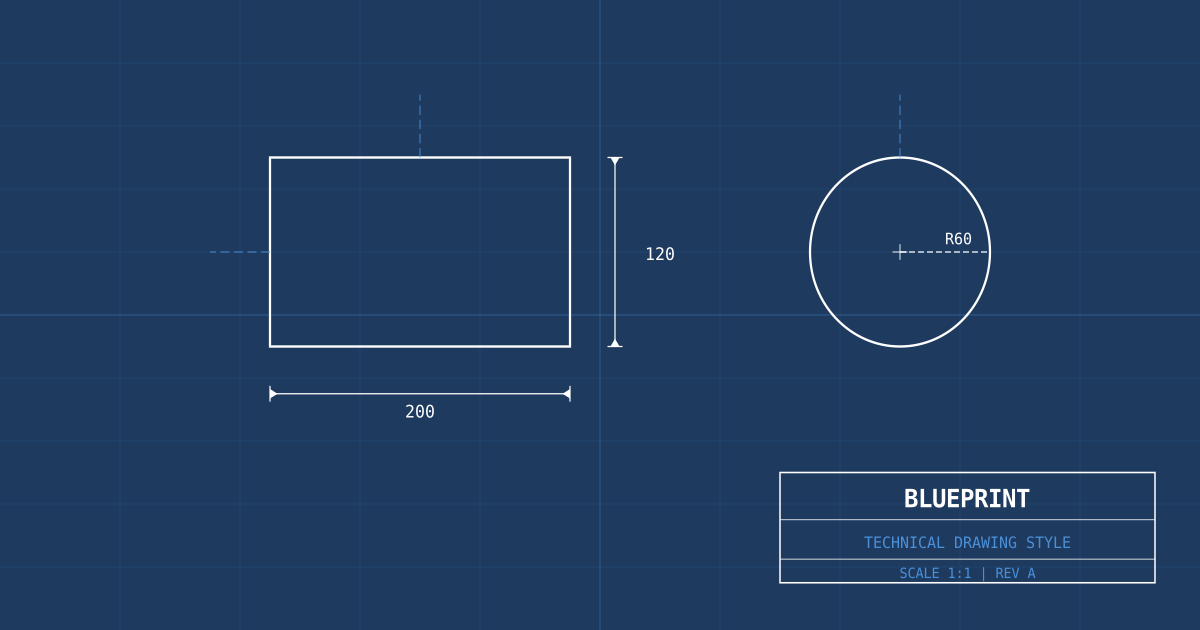
工程蓝图与技术图纸风格,蓝底白线、网格坐标、标注线和尺寸标记。适合建筑、工程、科技和教育领域。

工程蓝图视觉预览
主色#ffffff
次色#1e3a5f
强调色 1#4a90d9
强调色 2#ff6b35
强调色 3#a0c4e8
强调色 4#b071e4

AI 实现规则

STYLE: Blueprint
TYPE: Engineering technical drawing interface

MUST USE:
- Blueprint blue background: bg-[#1e3a5f]
- White lines and text: text-white, border-white/30
- Monospace font: font-mono for all text
- uppercase tracking-widest for labels
- Grid background pattern for coordinates
- Orange annotations: text-[#ff6b35] for highlights
- Light blue secondary: text-[#a0c4e8]
- Corner markers on cards (independent full-border squares)
- Dashed lines for auxiliary elements: border-dashed

MUST AVOID:
- Warm-toned backgrounds
- Rounded/soft design elements
- Gradient fills
- Glow or neon effects
- Serif or handwritten fonts
- Large colored blocks
- Large border-radius (rounded-2xl+)

COLOR RULES:
- White line: #ffffff (primary elements)
- Blueprint blue: #1e3a5f (background)
- Light blue: #4a90d9, #a0c4e8 (secondary elements)
- Annotation orange: #ff6b35 (highlights, callouts)

SPECIAL EFFECTS:
- Grid background pattern (20px spacing)
- Corner bracket markers on containers
- Dimension lines with end markers
- Coordinate labels as decorative elements

Animation & Interaction Rules:
- CAD Precision: 交互动效必须干脆、精密,优先使用 `duration-100`(可在 75-150ms 范围内微调),避免拖沓的 `ease-in-out`。
- Crosshair Reveals: 悬停可交互元素时,使用 `before`/`after` 或角落标记浮现十字准星与对位提示。
- Blueprint Highlight: 默认以蓝白为主,`active` 或确认态可短暂点亮工程橙 `#ff6b35`,但不能长时间占据主视觉。
- Grid Interaction: 容器 hover 可轻微提高网格线可见度(白线到浅蓝线),仅作为测量反馈,不做情绪化动画。

组件预览与实现

font-mono font-medium uppercase tracking-wider rounded-none border transition-all duration-200 bg-[#1e3a5f] text-white border-white/80 shadow-[0_0_0_1px_rgba(255,255,255,0.2)] hover:border-white hover:shadow-[0_0_12px_rgba(255,255,255,0.2)] active:scale-[0.97]
button

按钮

蓝图风格的技术按钮

// Blueprint Primary (Snappy)
<button className="group relative px-6 py-2 bg-transparent text-[#a0c4e8] font-mono text-sm uppercase tracking-widest border border-[#a0c4e8]/50 hover:bg-[#a0c4e8]/10 hover:border-white hover:text-white active:bg-[#ff6b35] active:border-[#ff6b35] active:text-white transition-all duration-100 motion-reduce:transition-none overflow-hidden">
  <span className="absolute top-1 left-1 w-1.5 h-1.5 border border border-white opacity-0 group-hover:opacity-100 transition-opacity duration-100" />
  <span className="absolute bottom-1 right-1 w-1.5 h-1.5 border border border-white opacity-0 group-hover:opacity-100 transition-opacity duration-100" />
  <span className="relative z-10">Execute</span>
</button>

// Blueprint Filled (CAD Confirm)
<button className="group relative px-6 py-2 bg-white text-[#1e3a5f] font-mono font-bold text-sm uppercase tracking-widest border border-white hover:bg-[#a0c4e8] active:bg-[#ff6b35] active:text-white active:border-[#ff6b35] transition-all duration-100 motion-reduce:transition-none overflow-hidden">
  <span className="absolute left-2 right-2 top-1/2 h-px -translate-y-1/2 bg-[#1e3a5f]/0 group-hover:bg-[#1e3a5f]/25 transition-colors duration-100" />
  <span className="relative z-10">Compile</span>
</button>

// Annotation Variant
<button className="group relative px-6 py-2 bg-transparent border border-[#ff6b35]/60 text-[#ff6b35] font-mono text-sm uppercase tracking-widest hover:bg-[#ff6b35]/10 hover:border-[#ff6b35] hover:text-white active:bg-[#ff6b35] active:text-white transition-all duration-100 motion-reduce:transition-none overflow-hidden">
  <span className="absolute inset-y-1 left-1 w-px bg-[#ff6b35]/0 group-hover:bg-[#ff6b35]" />
  <span className="absolute inset-y-1 right-1 w-px bg-[#ff6b35]/0 group-hover:bg-[#ff6b35]" />
  <span className="relative z-10">Annotate</span>
</button>
card

卡片

蓝图风格的制图卡片

<div className="group relative p-8 bg-[#1e3a5f] border border-white/20 hover:border-white/60 transition-colors duration-100 motion-reduce:transition-none cursor-crosshair overflow-hidden">
  {/* Blueprint Grid Overlay */}
  <div className="absolute inset-0 bg-[linear-gradient(rgba(255,255,255,0.05)_1px,transparent_1px),linear-gradient(90deg,rgba(255,255,255,0.05)_1px,transparent_1px)] bg-[size:20px_20px] pointer-events-none group-hover:bg-[linear-gradient(rgba(160,196,232,0.1)_1px,transparent_1px),linear-gradient(90deg,rgba(160,196,232,0.1)_1px,transparent_1px)] transition-all duration-100" />

  {/* Corner markers */}
  <div className="absolute top-2 left-2 w-3 h-3 border-2 border-2 border-white/40 group-hover:border-[#ff6b35] transition-colors duration-100" />
  <div className="absolute top-2 right-2 w-3 h-3 border-2 border-2 border-white/40 group-hover:border-[#ff6b35] transition-colors duration-100" />
  <div className="absolute bottom-2 left-2 w-3 h-3 border-2 border-2 border-white/40 group-hover:border-[#ff6b35] transition-colors duration-100" />
  <div className="absolute bottom-2 right-2 w-3 h-3 border-2 border-2 border-white/40 group-hover:border-[#ff6b35] transition-colors duration-100" />

  <div className="relative z-10 flex items-center gap-3 mb-4">
    <div className="w-2 h-[1px] bg-[#ff6b35]" />
    <span className="text-[#ff6b35] font-mono text-xs uppercase tracking-widest">Section A-2</span>
    <div className="flex-1 h-[1px] bg-white/10" />
  </div>
  <h3 className="relative z-10 text-white font-mono text-lg tracking-wider uppercase mb-3">
    Structural Overview
  </h3>
  <p className="relative z-10 text-[#a0c4e8]/75 font-mono text-sm leading-relaxed">
    Cross-section analysis of the primary load-bearing framework.
  </p>
</div>
input

输入框

蓝图风格的标注输入框

<div className="space-y-2">
  <label className="block text-[#a0c4e8] font-mono text-xs uppercase tracking-widest">Coordinate</label>
  <div className="relative">
    <input
      type="text"
      className="w-full px-4 py-3 bg-transparent border border-white/30 text-white font-mono placeholder-white/20 focus:outline-none focus:border-[#4a90d9] focus:bg-[#1e3a5f]/40 transition-all duration-200"
      placeholder="Enter value..."
    />
    <div className="absolute right-3 top-1/2 -translate-y-1/2 text-[#ff6b35] font-mono text-xs">XY</div>
  </div>
</div>

交互展示

适用范围与设计理念

应用场景

docssaas

视觉关键词

蓝图工程技术图纸网格标注坐标minimalcleansimple

Blueprint(工程蓝图)的设计灵感来自传统的氰版蓝图印刷工艺和现代工程制图。蓝色底色上的白色线条是其最具标志性的视觉特征,网格系统、标注线和尺寸标记赋予界面精确、专业、可信赖的气质。

核心理念:

- 蓝底白线:经典蓝图配色,深蓝背景上的白色线条和文字

- 网格系统:背景网格暗示精确的坐标系统和度量单位

- 标注语言:使用标注线、尺寸标记和坐标标记作为装饰与导航元素

- 技术字体:等宽字体强化工程制图的精确感

蓝图风格天然传递出"精心规划"和"专业可靠"的信息。它适合任何需要展现技术深度和工程思维的场景。UI 元素应该看起来像是在图纸上绘制的——按钮如同图例按钮,卡片如同图纸上的局部放大框,输入框如同标注栏。

适合场景:建筑设计事务所、工程咨询公司、科技产品发布页、教育机构、技术文档网站。

应该这样做

  • 背景使用蓝图蓝 bg-[#1e3a5f] 搭配网格线背景效果
  • 文字和线条使用白色 text-white 或浅蓝色 text-[#a0c4e8]
  • 使用等宽字体 font-mono 增强技术制图感
  • 边框使用白色/浅蓝色细线 border border-white/30
  • 标注元素使用橙色 text-[#ff6b35] 作为高亮标记
  • 卡片使用半透明背景 bg-[#1e3a5f]/60 backdrop-blur-sm
  • 添加网格背景 bg-[linear-gradient(rgba(255,255,255,0.05)_1px,transparent_1px),linear-gradient(90deg,rgba(255,255,255,0.05)_1px,transparent_1px)]
  • 使用虚线元素 border-dashed 模拟辅助线

避免这样做

  • 禁止使用暖色调背景
  • 禁止使用圆润、柔和的设计元素
  • 禁止使用渐变色填充(线条和填充应为纯色)
  • 禁止使用发光效果或霓虹阴影
  • 禁止使用衬线字体或手写体
  • 禁止使用大面积的彩色色块
  • 禁止使用圆角过大的元素 rounded-2xl rounded-3xl

全局 CSS

/* Blueprint Global Styles */
@layer base {
  body {
    @apply bg-[#1e3a5f] text-white antialiased;
    font-family: 'Courier New', Courier, monospace;
    background-image:
      linear-gradient(rgba(255, 255, 255, 0.03) 1px, transparent 1px),
      linear-gradient(90deg, rgba(255, 255, 255, 0.03) 1px, transparent 1px);
    background-size: 20px 20px;
  }

  ::selection {
    @apply bg-[#4a90d9] text-white;
  }
}

/* Blueprint grid (denser) */
.blueprint-grid {
  background-image:
    linear-gradient(rgba(255, 255, 255, 0.06) 1px, transparent 1px),
    linear-gradient(90deg, rgba(255, 255, 255, 0.06) 1px, transparent 1px),
    linear-gradient(rgba(255, 255, 255, 0.03) 1px, transparent 1px),
    linear-gradient(90deg, rgba(255, 255, 255, 0.03) 1px, transparent 1px);
  background-size: 100px 100px, 100px 100px, 20px 20px, 20px 20px;
}

/* Dimension line */
.blueprint-dimension {
  border: 1px solid rgba(255, 107, 53, 0.6);
  position: relative;
}
.blueprint-dimension::before,
.blueprint-dimension::after {
  content: '';
  position: absolute;
  top: -4px;
  width: 1px;
  height: 9px;
  background: rgba(255, 107, 53, 0.6);
}
.blueprint-dimension::before { left: 0; }
.blueprint-dimension::after { right: 0; }
/* Blueprint Design Tokens */
:root {
  --blueprint-primary: #ffffff;
  --blueprint-secondary: #1e3a5f;
  --blueprint-accent: #4a90d9;
  --blueprint-glow: rgba(255, 255, 255, 0.3);
}

@keyframes blueprint-fade-in {
  from { opacity: 0; transform: translateY(8px); }
  to { opacity: 1; transform: translateY(0); }
}

@keyframes blueprint-pulse {
  0%, 100% { opacity: 1; }
  50% { opacity: 0.7; }
}

.blueprint-frosted {
  backdrop-filter: blur(12px) saturate(180%);
  -webkit-backdrop-filter: blur(12px) saturate(180%);
  background: rgba(255, 255, 255, 0.08);
}

.blueprint-accent-corner {
  clip-path: polygon(0 0, 100% 0, 100% calc(100% - 2rem), calc(100% - 2rem) 100%, 0 100%);
}

.blueprint-animate-in {
  animation: blueprint-fade-in 0.5s ease-out both;
}

布局、色板与 Tokens

主色#ffffff
次色#1e3a5f
强调色 1#4a90d9
强调色 2#ff6b35
强调色 3#a0c4e8
强调色 4#b071e4
{
  "border": {
    "width": "border",
    "color": "border-white/30",
    "radius": "rounded-none",
    "style": "border-solid"
  },
  "shadow": {
    "sm": "shadow-none",
    "md": "shadow-none",
    "lg": "shadow-[0_2px_10px_rgba(0,0,0,0.3)]",
    "none": "shadow-none",
    "hover": "hover:bg-white/5",
    "focus": "focus:border-[#4a90d9]",
    "colored": {
      "orange": "shadow-[0_0_0_1px_rgba(255,107,53,0.4)]",
      "blue": "shadow-[0_0_0_1px_rgba(74,144,217,0.4)]"
    }
  },
  "interaction": {
    "transition": "transition-all duration-200",
    "active": "active:scale-95",
    "hoverScale": "hover:bg-white/10"
  },
  "typography": {
    "heading": "font-mono tracking-wider uppercase",
    "body": "font-mono",
    "mono": "font-mono",
    "sizes": {
      "hero": "text-3xl md:text-5xl lg:text-7xl",
      "h1": "text-2xl md:text-4xl",
      "h2": "text-xl md:text-3xl",
      "h3": "text-lg md:text-xl",
      "body": "text-sm md:text-base",
      "small": "text-xs"
    }
  },
  "spacing": {
    "section": "py-16 md:py-24",
    "container": "px-4 md:px-8",
    "card": "p-6",
    "gap": {
      "sm": "gap-4",
      "md": "gap-6",
      "lg": "gap-8"
    }
  },
  "colors": {
    "background": {
      "primary": "bg-[#1e3a5f]",
      "secondary": "bg-[#1e3a5f]/60",
      "accent": [
        "bg-white",
        "bg-[#4a90d9]",
        "bg-[#ff6b35]"
      ]
    },
    "text": {
      "primary": "text-white",
      "secondary": "text-[#a0c4e8]",
      "muted": "text-white/40"
    },
    "button": {
      "primary": "bg-transparent text-white border border-white/60",
      "secondary": "bg-white text-[#1e3a5f]",
      "danger": "bg-transparent text-[#ff6b35] border border-[#ff6b35]/60"
    }
  },
  "forbidden": {
    "classes": [
      "bg-white",
      "bg-gray-50",
      "bg-gray-100",
      "shadow-sm",
      "shadow-md",
      "shadow-lg",
      "rounded-xl",
      "rounded-2xl",
      "rounded-3xl",
      "rounded-full",
      "font-serif",
      "bg-gradient-"
    ],
    "patterns": [
      "^bg-(?:white|gray-[1-3]|slate-[1-3])",
      "^shadow-(?:sm|md|lg|xl|2xl)",
      "^rounded-(?:xl|2xl|3xl|full)",
      "^font-serif",
      "^bg-gradient-"
    ],
    "reasons": {
      "bg-white": "Blueprint uses deep blue backgrounds, not white",
      "shadow-md": "Blueprint uses minimal shadows; rely on borders and lines",
      "rounded-xl": "Blueprint uses sharp corners for technical precision",
      "font-serif": "Blueprint uses monospace fonts for engineering feel",
      "bg-gradient-": "Blueprint uses flat colors, not gradients"
    }
  },
  "required": {
    "button": [
      "px-6 py-3",
      "font-mono",
      "uppercase tracking-widest",
      "text-sm",
      "transition-all duration-200"
    ],
    "card": [
      "bg-[#1e3a5f]/60",
      "border border-white/20"
    ],
    "input": [
      "bg-transparent",
      "border border-white/30",
      "text-white",
      "font-mono",
      "focus:border-[#4a90d9]",
      "focus:outline-none"
    ]
  }
}

示例提示词

技术架构展示

蓝图风格的系统架构图

Create a technical architecture page using Blueprint style:
- Deep blue background with grid pattern
- System components as blueprint cards with corner markers
- Connection lines between components (dashed)
- Annotation callouts in orange
- All text in monospace uppercase
- Coordinate labels at corners for reference

SaaS 着陆页

生成 工程蓝图风格的 SaaS 产品着陆页

Create a SaaS landing page using Blueprint style with hero section, feature grid, testimonials, pricing table, and footer.

作品集展示

生成 工程蓝图风格的作品集页面

Create a portfolio showcase page using Blueprint style with project grid, about section, contact form, and consistent visual language.