返回风格库
布局风格modern

仪表盘布局

Dashboard Layout

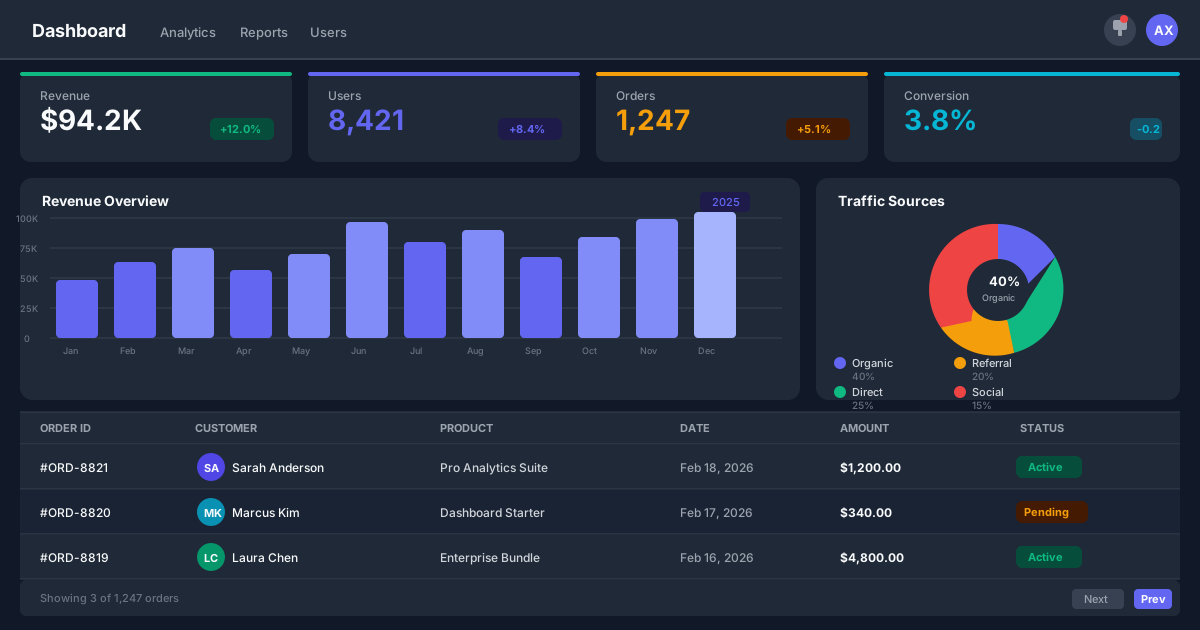
数据驱动的仪表盘布局,包含侧边导航、顶部工具栏、多模块数据面板和图表区域,适合后台管理系统、数据分析平台和监控面板。

仪表盘布局视觉预览
主色#111827
次色#f9fafb
强调色 1#6366f1
强调色 2#10b981
强调色 3#f59e0b
强调色 4#ef4444

AI 实现规则

你是一个 Dashboard Layout 布局专家。生成的所有代码必须严格遵守以下约束:

## 布局结构

- 左侧:深色侧边导航栏 w-64 bg-gray-900
- 顶部:白色工具栏(搜索、通知、用户)
- 主体:KPI 卡片 + 图表面板 + 数据表格

## KPI 卡片

- 使用 grid grid-cols-4 排列
- 每个卡片包含:标签、数值、变化趋势
- 增长用绿色 text-green-500
- 下降用红色 text-red-500
- 平稳用黄色 text-yellow-500

## 图表区域

- 主图表占 2/3 宽度 col-span-2
- 辅助图表占 1/3 宽度
- 使用 aspect-ratio 保持比例

## 侧边导航

- 深色背景 bg-gray-900
- 当前页面高亮 bg-white/10
- 图标 + 文字菜单项
- 底部放置用户信息

## 响应式

大屏幕:侧边栏 + 4列KPI + 图表
中等屏幕:侧边栏 + 2列KPI
小屏幕:隐藏侧边栏 + 1列KPI

## 自检

1. 侧边导航深色固定
2. KPI卡片数据清晰
3. 图表区域比例适当
4. 状态颜色编码正确
5. 响应式适配完善

## Animation & Interaction Rules

- Crisp SaaS Feel: 所有微交互应快速清晰,优先使用 `duration-150` + `ease-out`。
- KPI Focus: KPI 卡片 hover 时可轻微上浮,并通过 `group-hover` 让核心数字微放大或变色,强化视线聚焦。
- Hover Hinting: 数据卡片、数据行、可操作面板在悬停时必须提供明确底色反馈(如 `hover:bg-gray-50`)。
- Action Precision: 按钮点击应有明确按下反馈(如 `active:scale-[0.97]`),并保留可见 focus ring 以满足 a11y。

组件预览与实现

font-medium rounded-lg transition-colors duration-200 bg-[#6366f1] text-white hover:bg-[#4f46e5] active:bg-[#4338ca]
button

按钮

仪表盘中的操作按钮

<button className="
  px-4 py-2
  bg-[#6366f1] text-white
  rounded-lg
  font-medium text-sm
  hover:bg-[#4f46e5]
  active:scale-[0.97]
  focus:outline-none focus:ring-2 focus:ring-[#6366f1]/30 focus:ring-offset-1
  transition-all duration-150 ease-out
">
  Export Data
</button>
card

KPI 卡片

关键指标展示卡片

<div className="group p-6
  bg-white
  rounded-xl
  shadow-sm
  border border-gray-100
  hover:bg-gray-50
  hover:shadow-md hover:border-indigo-100 hover:-translate-y-0.5
  transition-all duration-150 ease-out
  cursor-pointer
">
  <div className="flex items-center justify-between mb-4">
    <span className="text-sm font-medium text-gray-500 group-hover:text-gray-700 transition-colors duration-150">Total Revenue</span>
    <span className="text-xs font-medium text-[#10b981] bg-[#10b981]/10 px-2 py-1 rounded-full group-hover:bg-[#10b981]/20 transition-colors duration-150">+12.5%</span>
  </div>
  <div className="text-3xl font-bold text-[#111827] origin-left group-hover:text-[#4f46e5] group-hover:scale-[1.02] transition-all duration-150">$48,230</div>
  <p className="text-sm text-gray-500 mt-1 group-hover:text-gray-600 transition-colors duration-150">vs. $42,890 last month</p>
</div>
input

搜索框

仪表盘搜索输入框

<div className="relative">
  <svg className="absolute left-3 top-1/2 -translate-y-1/2 w-4 h-4 text-gray-400" fill="none" viewBox="0 0 24 24" stroke="currentColor" strokeWidth="2">
    <path strokeLinecap="round" strokeLinejoin="round" d="M21 21l-6-6m2-5a7 7 0 11-14 0 7 7 0 0114 0z" />
  </svg>
  <input
    type="text"
    placeholder="Search..."
    className="
      w-full pl-10 pr-4 py-2
      bg-gray-50
      border border-gray-200
      rounded-lg
      text-sm text-[#111827] placeholder-gray-400
      focus:outline-none focus:ring-2 focus:ring-[#6366f1]/20
      focus:border-[#6366f1]
      transition-all
    "
  />
</div>
hero

仪表盘布局完整示例

完整的仪表盘页面结构

<div className="h-[480px] flex bg-[#f9fafb] overflow-hidden">
  {/* 侧边导航 */}
  <aside className="w-64 bg-[#111827] text-white flex-shrink-0 flex flex-col">
    <div className="p-6">
      <h1 className="text-lg font-bold">Dashboard</h1>
    </div>
    <nav className="flex-1 px-3 space-y-1">
      <a href="#" className="flex items-center gap-3 px-3 py-2.5 bg-white/10 rounded-lg text-sm font-medium">
        <svg className="w-5 h-5" fill="none" viewBox="0 0 24 24" stroke="currentColor" strokeWidth="2"><path strokeLinecap="round" strokeLinejoin="round" d="M3 12l2-2m0 0l7-7 7 7M5 10v10a1 1 0 001 1h3m10-11l2 2m-2-2v10a1 1 0 01-1 1h-3m-6 0a1 1 0 001-1v-4a1 1 0 011-1h2a1 1 0 011 1v4a1 1 0 001 1m-6 0h6" /></svg>
        Overview
      </a>
      <a href="#" className="flex items-center gap-3 px-3 py-2.5 text-gray-400 hover:text-white hover:bg-white/5 rounded-lg text-sm">
        <svg className="w-5 h-5" fill="none" viewBox="0 0 24 24" stroke="currentColor" strokeWidth="2"><path strokeLinecap="round" strokeLinejoin="round" d="M9 19v-6a2 2 0 00-2-2H5a2 2 0 00-2 2v6a2 2 0 002 2h2a2 2 0 002-2zm0 0V9a2 2 0 012-2h2a2 2 0 012 2v10m-6 0a2 2 0 002 2h2a2 2 0 002-2m0 0V5a2 2 0 012-2h2a2 2 0 012 2v14a2 2 0 01-2 2h-2a2 2 0 01-2-2z" /></svg>
        Analytics
      </a>
      <a href="#" className="flex items-center gap-3 px-3 py-2.5 text-gray-400 hover:text-white hover:bg-white/5 rounded-lg text-sm">
        <svg className="w-5 h-5" fill="none" viewBox="0 0 24 24" stroke="currentColor" strokeWidth="2"><path strokeLinecap="round" strokeLinejoin="round" d="M10.325 4.317c.426-1.756 2.924-1.756 3.35 0a1.724 1.724 0 002.573 1.066c1.543-.94 3.31.826 2.37 2.37a1.724 1.724 0 001.066 2.573c1.756.426 1.756 2.924 0 3.35a1.724 1.724 0 00-1.066 2.573c.94 1.543-.826 3.31-2.37 2.37a1.724 1.724 0 00-2.573 1.066c-.426 1.756-2.924 1.756-3.35 0a1.724 1.724 0 00-2.573-1.066c-1.543.94-3.31-.826-2.37-2.37a1.724 1.724 0 00-1.066-2.573c-1.756-.426-1.756-2.924 0-3.35a1.724 1.724 0 001.066-2.573c-.94-1.543.826-3.31 2.37-2.37.996.608 2.296.07 2.572-1.065z" /><path strokeLinecap="round" strokeLinejoin="round" d="M15 12a3 3 0 11-6 0 3 3 0 016 0z" /></svg>
        Settings
      </a>
    </nav>
  </aside>

  {/* 主区域 */}
  <div className="flex-1 flex flex-col min-w-0">
    {/* 顶部工具栏 */}
    <header className="bg-white border border-gray-200 px-6 py-3 flex items-center justify-between">
      <h2 className="text-lg font-semibold text-[#111827]">Overview</h2>
      <div className="flex items-center gap-4">
        <input type="text" placeholder="Search..." className="px-3 py-1.5 bg-gray-50 border border-gray-200 rounded-lg text-sm" />
        <div className="w-8 h-8 bg-[#6366f1] rounded-full" />
      </div>
    </header>

    {/* 内容区 */}
    <main className="flex-1 p-6">
      {/* KPI 卡片行 */}
      <div className="grid grid-cols-2 lg:grid-cols-4 gap-4 mb-6">
        <div className="bg-white rounded-xl p-4 shadow-sm border border-gray-100">
          <span className="text-xs text-gray-500">Revenue</span>
          <div className="text-2xl font-bold text-[#111827] mt-1">$48.2K</div>
          <span className="text-xs text-[#10b981]">+12.5%</span>
        </div>
        <div className="bg-white rounded-xl p-4 shadow-sm border border-gray-100">
          <span className="text-xs text-gray-500">Users</span>
          <div className="text-2xl font-bold text-[#111827] mt-1">2,420</div>
          <span className="text-xs text-[#10b981]">+5.2%</span>
        </div>
        <div className="bg-white rounded-xl p-4 shadow-sm border border-gray-100">
          <span className="text-xs text-gray-500">Orders</span>
          <div className="text-2xl font-bold text-[#111827] mt-1">1,210</div>
          <span className="text-xs text-[#ef4444]">-2.1%</span>
        </div>
        <div className="bg-white rounded-xl p-4 shadow-sm border border-gray-100">
          <span className="text-xs text-gray-500">Conversion</span>
          <div className="text-2xl font-bold text-[#111827] mt-1">3.6%</div>
          <span className="text-xs text-[#f59e0b]">+0.3%</span>
        </div>
      </div>

      {/* 图表区 */}
      <div className="grid grid-cols-1 lg:grid-cols-3 gap-4">
        <div className="col-span-2 bg-white rounded-xl p-6 shadow-sm border border-gray-100">
          <h3 className="font-medium text-[#111827] mb-4">Revenue Trend</h3>
          <div className="aspect-[2/1] bg-gray-50 rounded-lg" />
        </div>
        <div className="bg-white rounded-xl p-6 shadow-sm border border-gray-100">
          <h3 className="font-medium text-[#111827] mb-4">Distribution</h3>
          <div className="aspect-square bg-gray-50 rounded-lg" />
        </div>
      </div>
    </main>
  </div>
</div>

交互展示

适用范围与设计理念

应用场景

dashboardadminsaas

视觉关键词

responsive仪表盘数据面板图表监控后台分析moderncontemporarysleek

Dashboard Layout 是一种以数据展示为核心的布局方案,通过侧边导航、多模块数据面板和灵活的网格系统,让用户高效地监控和分析多维数据。

核心理念:

- 数据优先:所有布局决策服务于数据的高效展示

- 模块化:每个数据面板独立成模块,可灵活组合

- 密度控制:在信息密度和可读性之间取得平衡

- 实时性:布局支持数据的实时更新和刷新

设计原则:

- 视觉一致性:所有组件必须遵循统一的视觉语言,从色彩到字体到间距保持谐调

- 层次分明:通过颜色深浅、字号大小、留白空间建立清晰的信息层级

- 交互反馈:每个可交互元素都必须有明确的 hover、active、focus 状态反馈

- 响应式适配:设计必须在移动端、平板、桌面端上保持一致的体验

- 无障碍性:确保色彩对比度符合 WCAG 2.1 AA 标准,所有交互元素可键盘访问

应该这样做

  • 使用深色侧边导航栏 bg-gray-900 w-64
  • 顶部工具栏包含搜索、通知和用户信息
  • 使用 CSS Grid 排列数据面板 grid grid-cols-4
  • KPI 卡片使用大字号数字展示关键指标
  • 图表区域使用适当比例 aspect-video 或 aspect-square
  • 使用颜色编码区分数据状态(绿增红减)

避免这样做

  • 禁止侧边栏和内容区比例失调
  • 禁止数据面板间距不一致
  • 禁止忽略加载状态和空状态
  • 禁止所有面板大小完全相同
  • 禁止使用过多的装饰性元素分散注意力

全局 CSS

/* Dashboard Layout 全局样式 */

/* 仪表盘容器 */
.dashboard {
  display: flex;
  min-height: 100vh;
}

/* 侧边导航 */
.dashboard-sidebar {
  width: 256px;
  background: #111827;
  color: white;
  flex-shrink: 0;
  display: flex;
  flex-direction: column;
}

/* 主区域 */
.dashboard-main {
  flex: 1;
  display: flex;
  flex-direction: column;
  min-width: 0;
}

/* 顶部工具栏 */
.dashboard-toolbar {
  background: white;
  border: 1px solid #e5e7eb;
  padding: 0.75rem 1.5rem;
  display: flex;
  align-items: center;
  justify-content: space-between;
}

/* 内容区 */
.dashboard-content {
  flex: 1;
  padding: 1.5rem;
  background: #f9fafb;
}

/* KPI 卡片网格 */
.dashboard-kpi-grid {
  display: grid;
  grid-template-columns: repeat(4, 1fr);
  gap: 1rem;
  margin-bottom: 1.5rem;
}

/* 图表网格 */
.dashboard-chart-grid {
  display: grid;
  grid-template-columns: 2fr 1fr;
  gap: 1rem;
}

/* KPI 卡片 */
.dashboard-kpi {
  background: white;
  border-radius: 12px;
  padding: 1rem;
  border: 1px solid #f3f4f6;
}

/* 状态颜色 */
.dashboard-up { color: #10b981; }
.dashboard-down { color: #ef4444; }
.dashboard-neutral { color: #f59e0b; }

/* 响应式 */
@media (max-width: 1024px) {
  .dashboard-kpi-grid {
    grid-template-columns: repeat(2, 1fr);
  }
  .dashboard-chart-grid {
    grid-template-columns: 1fr;
  }
}

@media (max-width: 768px) {
  .dashboard-sidebar {
    display: none;
  }
  .dashboard-kpi-grid {
    grid-template-columns: 1fr;
  }
}
/* Dashboard Layout Design Tokens */
:root {
  --dashboard-layout-primary: #111827;
  --dashboard-layout-secondary: #f9fafb;
  --dashboard-layout-accent: #6366f1;
  --dashboard-layout-glow: rgba(17, 24, 39, 0.3);
}

@keyframes dashboard-layout-fade-in {
  from { opacity: 0; transform: translateY(8px); }
  to { opacity: 1; transform: translateY(0); }
}

@keyframes dashboard-layout-pulse {
  0%, 100% { opacity: 1; }
  50% { opacity: 0.7; }
}

.dashboard-layout-card {
  position: relative;
  overflow: hidden;
}

.dashboard-layout-card::before {
  content: "";
  position: absolute;
  inset: 0;
  opacity: 0;
  transition: opacity 0.3s ease;
  background: linear-gradient(135deg, rgba(17, 24, 39, 0.05), transparent);
  pointer-events: none;
}

.dashboard-layout-card:hover::before {
  opacity: 1;
}

.dashboard-layout-gradient {
  background: linear-gradient(135deg, #111827, #6366f1);
}

.dashboard-layout-gradient-text {
  background: linear-gradient(135deg, #111827, #6366f1);
  -webkit-background-clip: text;
  -webkit-text-fill-color: transparent;
  background-clip: text;
}

.dashboard-layout-frosted {
  backdrop-filter: blur(12px) saturate(180%);
  -webkit-backdrop-filter: blur(12px) saturate(180%);
  background: rgba(17, 24, 39, 0.08);
}

.dashboard-layout-accent-corner {
  clip-path: polygon(0 0, 100% 0, 100% calc(100% - 2rem), calc(100% - 2rem) 100%, 0 100%);
}

.dashboard-layout-animate-in {
  animation: dashboard-layout-fade-in 0.5s ease-out both;
}

布局、色板与 Tokens

主色#111827
次色#f9fafb
强调色 1#6366f1
强调色 2#10b981
强调色 3#f59e0b
强调色 4#ef4444
{
  "border": {
    "width": "border",
    "color": "border-gray-200",
    "radius": "rounded-xl",
    "style": "border-solid"
  },
  "shadow": {
    "sm": "shadow-sm",
    "md": "shadow-sm",
    "lg": "shadow-md",
    "none": "shadow-none",
    "hover": "hover:shadow-md",
    "focus": "focus:shadow-sm",
    "colored": {}
  },
  "interaction": {
    "transition": "transition-colors duration-200",
    "active": "active:scale-95",
    "hoverOpacity": "hover:opacity-90"
  },
  "typography": {
    "heading": "font-semibold tracking-tight",
    "body": "font-sans",
    "mono": "font-mono",
    "sizes": {
      "hero": "text-2xl md:text-3xl",
      "h1": "text-xl md:text-2xl",
      "h2": "text-lg md:text-xl",
      "h3": "text-sm md:text-base",
      "body": "text-sm",
      "small": "text-xs"
    }
  },
  "spacing": {
    "section": "py-4 md:py-6",
    "container": "px-4 md:px-6",
    "card": "p-4 md:p-6",
    "gap": {
      "sm": "gap-2 md:gap-3",
      "md": "gap-3 md:gap-4",
      "lg": "gap-4 md:gap-6"
    }
  },
  "colors": {
    "background": {
      "primary": "bg-[#f9fafb]",
      "secondary": "bg-white",
      "accent": [
        "bg-[#6366f1]",
        "bg-[#10b981]",
        "bg-[#f59e0b]",
        "bg-[#ef4444]"
      ]
    },
    "text": {
      "primary": "text-[#111827]",
      "secondary": "text-gray-500",
      "muted": "text-gray-400"
    },
    "button": {
      "primary": "bg-[#6366f1] text-white",
      "secondary": "bg-gray-100 text-gray-700",
      "danger": "bg-[#ef4444] text-white"
    }
  },
  "forbidden": {
    "classes": [
      "rounded-none",
      "shadow-2xl",
      "font-black",
      "font-extrabold",
      "text-5xl",
      "text-6xl",
      "text-7xl",
      "text-8xl",
      "rounded-3xl",
      "rounded-full"
    ],
    "patterns": [
      "^rounded-(?:none|3xl|full)",
      "^shadow-2xl",
      "^text-[5-8]xl"
    ],
    "reasons": {
      "rounded-none": "Dashboard Layout uses rounded-xl for a modern data panel aesthetic",
      "shadow-2xl": "Dashboard Layout uses minimal shadows to keep data focused",
      "text-6xl": "Dashboard Layout uses compact typography for data-dense screens",
      "rounded-full": "Dashboard Layout uses consistent rounded-xl panels, not pill shapes"
    }
  },
  "required": {
    "button": [
      "rounded-lg",
      "font-medium text-sm",
      "transition-colors"
    ],
    "card": [
      "bg-white",
      "rounded-xl",
      "shadow-sm",
      "border border-gray-100"
    ],
    "input": [
      "bg-gray-50",
      "border border-gray-200",
      "rounded-lg",
      "text-sm",
      "focus:outline-none",
      "focus:ring-2 focus:ring-[#6366f1]/20 focus:border-[#6366f1]",
      "transition-all"
    ]
  }
}

示例提示词

电商仪表盘

电商数据分析仪表盘

用 Dashboard Layout 设计一个电商仪表盘,要求:
1. 侧边栏:概览、订单、商品、客户、分析、设置
2. KPI:总收入、订单数、平均客单价、退货率
3. 主图表:收入趋势折线图(占2/3宽)
4. 辅助图表:商品分类饼图
5. 底部:最近订单表格
6. 所有数字带增长/下降百分比
7. 响应式折叠侧边栏

SaaS 着陆页

生成 仪表盘布局风格的 SaaS 产品着陆页

Create a SaaS landing page using Dashboard Layout style with hero section, feature grid, testimonials, pricing table, and footer.

作品集展示

生成 仪表盘布局风格的作品集页面

Create a portfolio showcase page using Dashboard Layout style with project grid, about section, contact form, and consistent visual language.