返回风格库
视觉风格modern

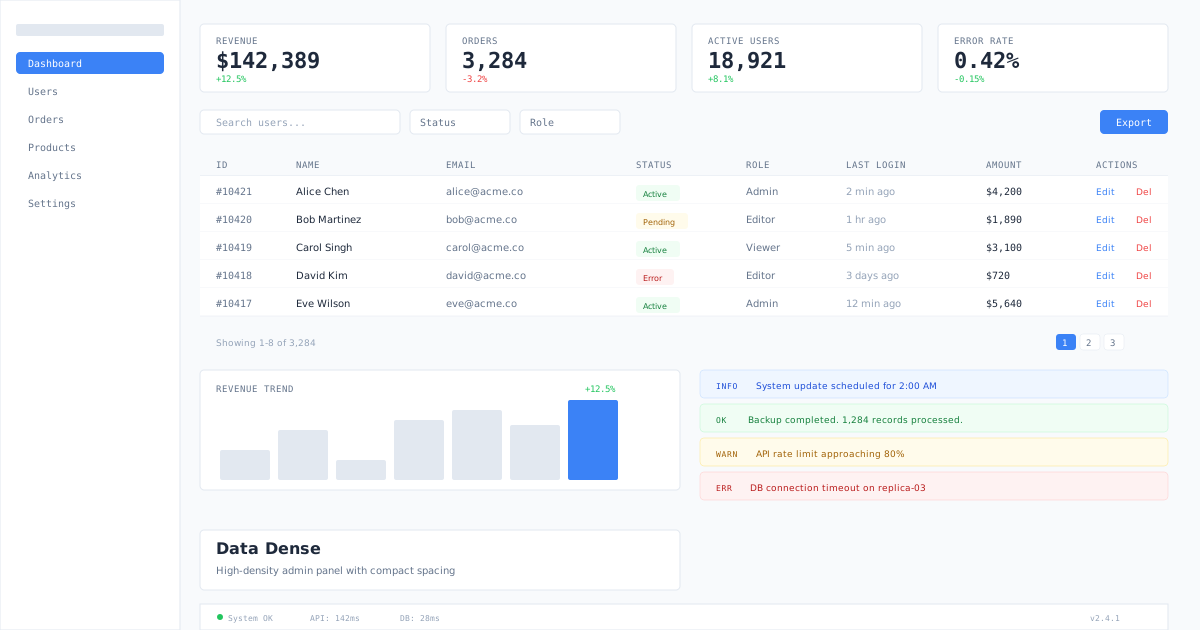
数据密集

Data Dense

高密度后台管理面板风格,紧凑间距与小尺寸组件,优先展示数据表格与操作效率。

数据密集视觉预览
主色#ffffff
次色#f8fafc
强调色 1#3b82f6
强调色 2#ef4444
强调色 3#22c55e
强调色 4#64748b

AI 实现规则

You are a Data Dense admin panel design expert.

## Absolute Rules
- Maximum information density: py-2 or less for table rows
- All text in tables must be text-sm or text-xs
- Numbers and IDs must use font-mono
- Status must be color-coded (green=active, yellow=pending, red=error, blue=info)
- Buttons must be small: px-2.5 py-1 text-xs
- Table headers must be uppercase text-[10px] tracking-wide

## Forbidden
- Large padding (p-6+)
- Large rounded corners (rounded-xl+)
- Decorative gradients or heavy shadows
- Large font sizes in data areas
- Hidden frequent actions in menus
- Large whitespace gaps

## Responsive
- Mobile: horizontal scroll for tables, stacked cards for KPIs
- Desktop: full table view with inline actions

组件预览与实现

font-medium rounded transition-colors duration-150 bg-[#3b82f6] text-white hover:bg-[#2563eb] active:scale-[0.97]
button

操作按钮

紧凑行内操作按钮

<div className="flex items-center gap-1.5">
  <button className="px-2.5 py-1 text-xs font-medium bg-[#3b82f6] text-white rounded hover:bg-[#2563eb] transition-colors">Save</button>
  <button className="px-2.5 py-1 text-xs font-medium border border-[#e2e8f0] text-[#64748b] rounded hover:bg-[#f8fafc] transition-colors">Cancel</button>
  <button className="px-2.5 py-1 text-xs font-medium text-[#ef4444] hover:bg-red-50 rounded transition-colors">Delete</button>
</div>
card

统计卡片

紧凑 KPI 指标卡

<div className="flex gap-3">
  <div className="flex-1 bg-white border border-[#e2e8f0] rounded px-3 py-2.5">
    <p className="text-[10px] uppercase tracking-wide text-[#64748b] mb-0.5">Revenue</p>
    <p className="text-lg font-semibold text-[#1e293b] font-mono">$42,389</p>
    <p className="text-[10px] text-[#22c55e]">+12.5%</p>
  </div>
  <div className="flex-1 bg-white border border-[#e2e8f0] rounded px-3 py-2.5">
    <p className="text-[10px] uppercase tracking-wide text-[#64748b] mb-0.5">Orders</p>
    <p className="text-lg font-semibold text-[#1e293b] font-mono">1,284</p>
    <p className="text-[10px] text-[#ef4444]">-3.2%</p>
  </div>
  <div className="flex-1 bg-white border border-[#e2e8f0] rounded px-3 py-2.5">
    <p className="text-[10px] uppercase tracking-wide text-[#64748b] mb-0.5">Users</p>
    <p className="text-lg font-semibold text-[#1e293b] font-mono">8,921</p>
    <p className="text-[10px] text-[#22c55e]">+8.1%</p>
  </div>
</div>
input

过滤输入

紧凑筛选输入框

<input type="text" placeholder="Filter..." className="px-2.5 py-1.5 text-xs border border-[#e2e8f0] rounded bg-white text-[#1e293b] placeholder:text-[#94a3b8] focus:outline-none focus:ring-1 focus:ring-[#3b82f6] focus:border-[#3b82f6] transition-colors w-48" />
nav

管理导航

紧凑侧栏导航

<nav className="w-48 bg-[#f8fafc] border border-[#e2e8f0] py-3 text-xs">
  <div className="px-3 mb-3">
    <p className="text-[10px] uppercase tracking-wide text-[#94a3b8] mb-2">Navigation</p>
  </div>
  <div className="space-y-0.5 px-1.5">
    <div className="px-2 py-1.5 rounded bg-[#3b82f6] text-white font-medium cursor-pointer">Dashboard</div>
    <div className="px-2 py-1.5 rounded text-[#64748b] hover:bg-white hover:text-[#1e293b] transition-colors cursor-pointer">Users</div>
    <div className="px-2 py-1.5 rounded text-[#64748b] hover:bg-white hover:text-[#1e293b] transition-colors cursor-pointer">Orders</div>
    <div className="px-2 py-1.5 rounded text-[#64748b] hover:bg-white hover:text-[#1e293b] transition-colors cursor-pointer">Products</div>
    <div className="px-2 py-1.5 rounded text-[#64748b] hover:bg-white hover:text-[#1e293b] transition-colors cursor-pointer">Settings</div>
  </div>
</nav>
hero

数据表格

高密度数据表

<div className="border border-[#e2e8f0] rounded overflow-hidden">
  <table className="w-full text-xs">
    <thead>
      <tr className="bg-[#f8fafc] border border-[#e2e8f0]">
        <th className="text-left px-3 py-2 text-[10px] uppercase tracking-wide text-[#64748b] font-medium">ID</th>
        <th className="text-left px-3 py-2 text-[10px] uppercase tracking-wide text-[#64748b] font-medium">Name</th>
        <th className="text-left px-3 py-2 text-[10px] uppercase tracking-wide text-[#64748b] font-medium">Status</th>
        <th className="text-right px-3 py-2 text-[10px] uppercase tracking-wide text-[#64748b] font-medium">Amount</th>
      </tr>
    </thead>
    <tbody className="divide-y divide-[#e2e8f0]">
      <tr className="hover:bg-[#f8fafc]">
        <td className="px-3 py-2 font-mono text-[#64748b]">#1042</td>
        <td className="px-3 py-2 text-[#1e293b]">Order Alpha</td>
        <td className="px-3 py-2"><span className="px-1.5 py-0.5 rounded bg-green-50 text-green-700 text-[10px]">Active</span></td>
        <td className="px-3 py-2 text-right font-mono text-[#1e293b]">$1,200</td>
      </tr>
      <tr className="hover:bg-[#f8fafc]">
        <td className="px-3 py-2 font-mono text-[#64748b]">#1041</td>
        <td className="px-3 py-2 text-[#1e293b]">Order Beta</td>
        <td className="px-3 py-2"><span className="px-1.5 py-0.5 rounded bg-yellow-50 text-yellow-700 text-[10px]">Pending</span></td>
        <td className="px-3 py-2 text-right font-mono text-[#1e293b]">$890</td>
      </tr>
    </tbody>
  </table>
</div>
footer

状态栏

底部状态信息栏

<footer className="flex items-center justify-between px-3 py-2 bg-[#f8fafc] border border-[#e2e8f0] text-[10px] text-[#94a3b8]">
  <span>Showing 1-50 of 1,284 results</span>
  <div className="flex items-center gap-1">
    <button className="px-2 py-0.5 rounded border border-[#e2e8f0] hover:bg-white transition-colors">Prev</button>
    <button className="px-2 py-0.5 rounded bg-[#3b82f6] text-white">1</button>
    <button className="px-2 py-0.5 rounded border border-[#e2e8f0] hover:bg-white transition-colors">2</button>
    <button className="px-2 py-0.5 rounded border border-[#e2e8f0] hover:bg-white transition-colors">3</button>
    <button className="px-2 py-0.5 rounded border border-[#e2e8f0] hover:bg-white transition-colors">Next</button>
  </div>
</footer>

交互展示

适用范围与设计理念

应用场景

admindashboardsaas

视觉关键词

后台管理数据表格高密度管理面板运营adminmoderncontemporarysleek现代

Data Dense 是一种效率优先的管理界面设计语言。

核心理念:

- 信息密度最大化:在有限屏幕空间内展示最多有效信息

- 扫描效率:行高紧凑、对齐严格,支持快速垂直扫描

- 操作即时性:行内操作、快捷键、批量选择减少点击次数

- 状态可视化:颜色编码传递状态,无需阅读文字即可理解

设计原则:

- 视觉一致性:所有组件必须遵循统一的视觉语言,从色彩到字体到间距保持谐调

- 层次分明:通过颜色深浅、字号大小、留白空间建立清晰的信息层级

- 交互反馈:每个可交互元素都必须有明确的 hover、active、focus 状态反馈

- 响应式适配:设计必须在移动端、平板、桌面端上保持一致的体验

- 无障碍性:确保色彩对比度符合 WCAG 2.1 AA 标准,所有交互元素可键盘访问

应该这样做

  • 使用白色 bg-white 搭配极浅蓝灰 bg-[#f8fafc] 交替行色
  • 表格行高紧凑 py-2 text-sm 或 text-xs
  • 状态标签使用颜色编码 bg-blue-50 text-blue-700 rounded px-1.5 py-0.5 text-xs
  • 按钮使用小尺寸 px-2.5 py-1 text-xs rounded
  • 间距统一使用 4px 递增:gap-1 gap-2 gap-3
  • 表头使用 text-xs uppercase tracking-wide text-[#64748b] font-medium
  • 使用 monospace 显示数字、ID、代码类数据
  • 分隔线使用 border-[#e2e8f0] 细线

避免这样做

  • 禁止使用大间距 p-6 以上(浪费数据展示空间)
  • 禁止使用大圆角 rounded-xl 以上(占用像素)
  • 禁止使用大字号 text-lg 以上作为表格数据
  • 禁止使用装饰性渐变或阴影(增加视觉噪音)
  • 禁止隐藏重要操作在下拉菜单中(常用操作必须直接可见)
  • 禁止使用大面积空白(数据优先)

全局 CSS

.data-dense-badge {
  display: inline-flex;
  align-items: center;
  padding: 0.125rem 0.375rem;
  font-size: 0.625rem;
  border-radius: 0.25rem;
  font-weight: 500;
}
.data-dense-badge--success { background: #f0fdf4; color: #15803d; }
.data-dense-badge--warning { background: #fffbeb; color: #a16207; }
.data-dense-badge--error { background: #fef2f2; color: #b91c1c; }
.data-dense-badge--info { background: #eff6ff; color: #1d4ed8; }
@keyframes data-dense-fade-in {
  from { opacity: 0; transform: translateY(8px); }
  to { opacity: 1; transform: translateY(0); }
}

@keyframes data-dense-pulse {
  0%, 100% { opacity: 1; }
  50% { opacity: 0.7; }
}

.data-dense-card {
  position: relative;
  overflow: hidden;
}

.data-dense-card::before {
  content: "";
  position: absolute;
  inset: 0;
  opacity: 0;
  transition: opacity 0.3s ease;
  background: linear-gradient(135deg, rgba(255, 255, 255, 0.05), transparent);
  pointer-events: none;
}

.data-dense-card:hover::before {
  opacity: 1;
}

.data-dense-gradient {
  background: linear-gradient(135deg, #ffffff, #3b82f6);
}

.data-dense-gradient-text {
  background: linear-gradient(135deg, #ffffff, #3b82f6);
  -webkit-background-clip: text;
  -webkit-text-fill-color: transparent;
  background-clip: text;
}

.data-dense-frosted {
  backdrop-filter: blur(12px) saturate(180%);
  -webkit-backdrop-filter: blur(12px) saturate(180%);
  background: rgba(255, 255, 255, 0.08);
}

.data-dense-accent-corner {
  clip-path: polygon(0 0, 100% 0, 100% calc(100% - 2rem), calc(100% - 2rem) 100%, 0 100%);
}

.data-dense-animate-in {
  animation: data-dense-fade-in 0.5s ease-out both;
}

布局、色板与 Tokens

主色#ffffff
次色#f8fafc
强调色 1#3b82f6
强调色 2#ef4444
强调色 3#22c55e
强调色 4#64748b
{
  "border": {
    "width": "border",
    "color": "border-[#e2e8f0]",
    "radius": "rounded",
    "style": "border-solid"
  },
  "shadow": {
    "sm": "shadow-none",
    "md": "shadow-sm",
    "lg": "shadow-sm",
    "none": "shadow-none",
    "hover": "hover:shadow-sm",
    "focus": "ring-1 ring-[#3b82f6]",
    "colored": {}
  },
  "interaction": {
    "transition": "transition-colors duration-150",
    "active": "active:scale-95",
    "hoverScale": "hover:bg-[#f8fafc]"
  },
  "typography": {
    "heading": "font-semibold tracking-tight",
    "body": "font-normal",
    "mono": "font-mono",
    "sizes": {
      "hero": "text-xl md:text-2xl",
      "h1": "text-lg md:text-xl",
      "h2": "text-base md:text-lg",
      "h3": "text-sm md:text-base",
      "body": "text-xs md:text-sm",
      "small": "text-[10px]"
    }
  },
  "spacing": {
    "section": "py-3 md:py-4",
    "container": "px-3 md:px-4",
    "card": "px-3 py-2.5",
    "gap": {
      "sm": "gap-1",
      "md": "gap-2",
      "lg": "gap-3"
    }
  },
  "colors": {
    "background": {
      "primary": "bg-white",
      "secondary": "bg-[#f8fafc]",
      "accent": [
        "bg-[#3b82f6]"
      ]
    },
    "text": {
      "primary": "text-[#1e293b]",
      "secondary": "text-[#64748b]",
      "muted": "text-[#94a3b8]"
    },
    "button": {
      "primary": "bg-[#3b82f6] text-white hover:bg-[#2563eb]",
      "secondary": "bg-white text-[#64748b] border border-[#e2e8f0]",
      "danger": "text-[#ef4444] hover:bg-red-50"
    }
  },
  "forbidden": {
    "classes": [
      "rounded-xl",
      "rounded-2xl",
      "shadow-lg",
      "shadow-xl",
      "shadow-2xl",
      "p-6",
      "p-8",
      "text-lg",
      "text-xl",
      "text-2xl"
    ],
    "patterns": [
      "^rounded-(xl|2xl|3xl|full)",
      "^shadow-(lg|xl|2xl)",
      "^p-[6-9]",
      "^bg-gradient-"
    ],
    "reasons": {
      "rounded-xl": "Data Dense uses small rounded corners only",
      "shadow-lg": "Data Dense avoids decorative shadows",
      "p-6": "Data Dense uses compact spacing (p-3 or less)",
      "text-lg": "Data Dense uses small text sizes (text-sm or text-xs)"
    }
  },
  "required": {
    "button": [
      "px-2.5 py-1",
      "text-xs",
      "rounded",
      "transition-colors"
    ],
    "card": [
      "bg-white",
      "border border-[#e2e8f0]",
      "rounded"
    ],
    "input": [
      "px-2.5 py-1.5",
      "text-xs",
      "border border-[#e2e8f0]",
      "rounded",
      "focus:ring-1 focus:ring-[#3b82f6]"
    ]
  }
}

示例提示词

管理后台仪表盘

高密度后台面板,含 KPI 卡片、数据表格、筛选栏

Build a data-dense admin dashboard with 4 compact KPI cards at top, filter toolbar with search and dropdowns, dense data table with inline status badges and action buttons, and pagination footer.

SaaS 着陆页

生成 数据密集风格的 SaaS 产品着陆页

Create a SaaS landing page using Data Dense style with hero section, feature grid, testimonials, pricing table, and footer.

作品集展示

生成 数据密集风格的作品集页面

Create a portfolio showcase page using Data Dense style with project grid, about section, contact form, and consistent visual language.