返回风格库
视觉风格modern

发布会主题

Launch Keynote

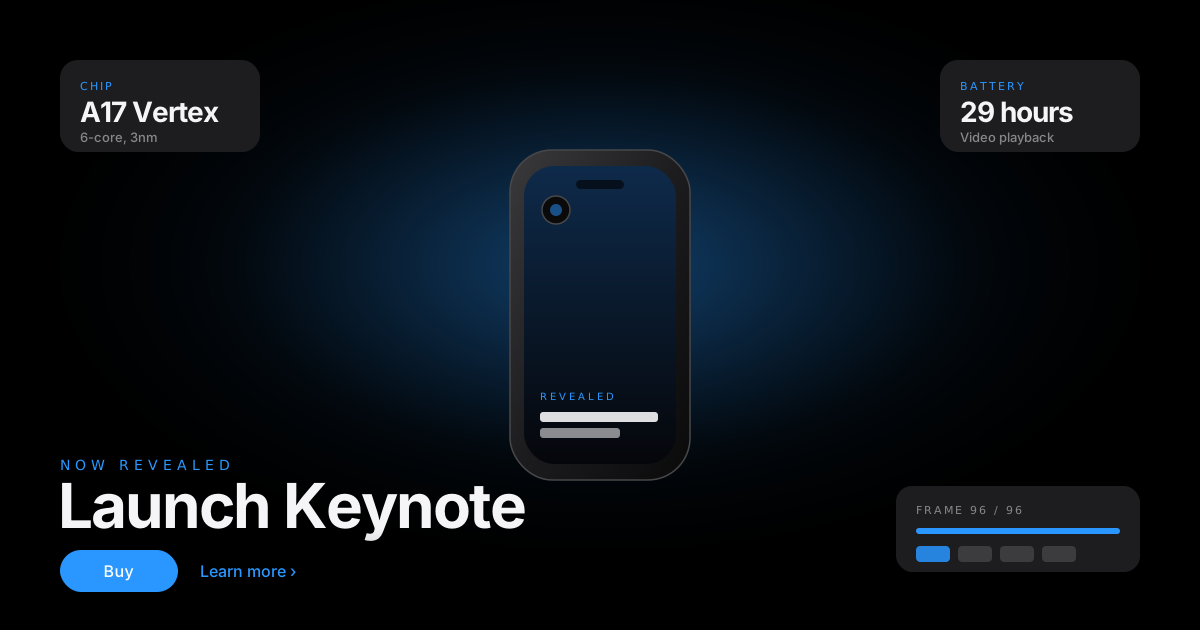
苹果发布会式的产品揭幕美学:纯黑舞台、发光产品、超大紧字距标题、唯一电蓝强调。招牌技法是滚动逐帧序列——一个 sticky 画布随滚动播放预渲染的产品动画,一屏一产品一句话,像万亿市值的产品页。

发布会主题视觉预览
主色#000000
次色#F5F5F7
强调色 1#2997FF
强调色 2#1D1D1F
强调色 3#86868B

AI 实现规则

你是一个发布会主题(Launch Keynote)风格的前端开发专家。生成的所有代码必须严格遵守以下约束:

## 绝对禁止

- 多彩渐变或第二支强调色(唯一电蓝之外全是黑白灰)
- 在滚动处理器里逐帧读 offsetTop / getBoundingClientRect(layout thrash)
- 页面一载就预载全部帧(必须 IO 懒加载)
- 把关键信息烘焙进帧图(帧可能没加载 / reduced-motion 只显一帧)
- 卡片边框、圆角装饰堆砌破坏纯黑舞台的无限深
- 忽略 prefers-reduced-motion 与 devicePixelRatio 封顶

## 必须遵守

### 纯黑舞台 + 唯一电蓝
- 背景恒 #000000,抬升面 #1D1D1F,文字近白 #F5F5F7,次要中灰 #86868B
- 全站唯一强调 #2997FF(按下态 #0071E3):链接、CTA、关键规格数字
- 无装饰纹理;留白即戏剧张力;一屏一产品一句话

### 招牌:滚动逐帧序列(scroll-scrub)
结构 = 一个高 ~350vh 的 section,内含 sticky top-0 h-screen 的 canvas:
```html
<section class="relative h-[350vh]">
  <div class="sticky top-0 h-screen flex items-center justify-center">
    <canvas aria-hidden="true"></canvas>
  </div>
</section>
```

懒加载(进视口才预载 96 帧 webp):
```js
const io = new IntersectionObserver(([e]) => {
  if (!e.isIntersecting) return; io.disconnect();
  for (let i = 0; i < 96; i++) {
    const img = new Image();
    img.src = "/frames/frame-" + String(i).padStart(4, "0") + ".webp";
    frames[i] = img;
  }
}, { rootMargin: "50% 0px" });
io.observe(sectionEl);
```

rAF 滚动擦除(一帧只读一次滚动位置):
```js
let raf = 0;
function draw() {
  raf = 0;
  const rect = sectionEl.getBoundingClientRect();
  const total = rect.height - innerHeight;
  const p = Math.min(1, Math.max(0, -rect.top / total));
  const idx = Math.min(95, Math.floor(p * 95));
  const img = frames[idx];
  if (img && img.complete) paint(canvas, img); // 缓存上一帧,未加载则保留
}
addEventListener("scroll", () => { if (!raf) raf = requestAnimationFrame(draw); }, { passive: true });
```

canvas 尺寸(devicePixelRatio 感知、封顶 2):
```js
const dpr = Math.min(2, devicePixelRatio || 1);
canvas.width = w * dpr; canvas.height = h * dpr;
ctx.setTransform(dpr, 0, 0, dpr, 0, 0);
// object-fit: contain 手绘:算出等比缩放,黑边留白
```

帧数/尺寸:webp 序列(如 1280x720),96 帧左右;始终配 poster.webp 先画防白屏。

### callout 里程碑
3-4 个文字块在特定进度(如 p>0.2, p>0.5, p>0.8)淡入 + translateY,只动 opacity/transform。

### 降级(关键)
- prefers-reduced-motion: 不绑滚动,静态渲染最终帧 frame-0095,所有 callout 直接可见
- 帧未加载:保留上一帧(drawn 缓存),绝不清屏白闪

### 排版
系统 SF 栈:-apple-system, BlinkMacSystemFont, "Segoe UI", Roboto...;hero clamp 到 ~7rem,字距 -0.03em;权重 600/400 两档;规格用大数字网格。

## 自检

1. 背景纯黑 + 唯一电蓝,无第二强调色?
2. scrub = sticky canvas + rAF,一帧只读一次滚动?
3. 96 帧 IO 懒加载,poster 先画,未加载保留上一帧?
4. devicePixelRatio 封顶 2、显式 aspect-ratio 防 CLS?
5. prefers-reduced-motion 静态渲染最终帧 + callout 全可见?
6. 关键信息在文字层不在帧里?

组件预览与实现

inline-flex items-center gap-1.5 rounded-full font-medium tracking-tight transition-all duration-300 ease-out active:scale-[0.98] bg-[#2997FF] text-white hover:bg-[#0071E3]
button

Button

Electric-blue pill CTA and a hairline secondary

<button className="inline-flex items-center gap-1.5
  px-6 py-3 rounded-full
  bg-[#2997FF] text-white font-medium tracking-tight
  hover:bg-[#0071E3] active:scale-[0.98]
  transition-all duration-300">
  Buy
</button>

<a href="#learn" className="inline-flex items-center gap-1
  text-[#2997FF] font-medium tracking-tight
  hover:underline underline-offset-4">
  Learn more
  <span aria-hidden>&rsaquo;</span>
</a>
card

Card

Elevated dark panel that floats on the black stage

<article className="rounded-3xl bg-[#1D1D1F] p-8">
  <p className="text-xs uppercase tracking-[0.2em] text-[#2997FF] mb-3">Chip</p>
  <h3 className="text-white text-2xl font-semibold tracking-tight mb-2">
    A17 performance
  </h3>
  <p className="text-[#86868B] leading-relaxed">
    The fastest ever, and it is only getting started.
  </p>
</article>
input

Input

Minimal field that reads clearly on the dark stage

<input type="email" placeholder="Email for launch updates"
  className="w-full px-5 py-3 rounded-xl
    bg-[#1D1D1F] border border-white/10
    text-[#F5F5F7] placeholder-[#86868B]
    focus:outline-none focus:border-[#2997FF]
    transition-colors duration-300" />
nav

Navigation

Frosted keynote bar with a single blue CTA

<nav className="fixed top-0 inset-x-0 z-50 bg-black/70 backdrop-blur-xl border border-white/10">
  <div className="max-w-6xl mx-auto px-6 h-12 flex items-center justify-between">
    <span className="text-[#F5F5F7] font-semibold tracking-tight">Vertex Pro</span>
    <div className="flex items-center gap-6 text-sm text-[#F5F5F7]/80">
      <a href="#overview" className="hover:text-white transition-colors">Overview</a>
      <a href="#specs" className="hover:text-white transition-colors">Specs</a>
      <a href="#buy" className="text-[#2997FF] hover:underline">Buy</a>
    </div>
  </div>
</nav>
hero

Hero

Scroll-scrubbed frame sequence: sticky canvas playing a webp frame set as the playhead moves

function ScrubReveal() {
  const wrapRef = useRef(null);
  const canvasRef = useRef(null);
  const frames = useRef([]);
  const drawn = useRef(-1);

  // Lazy-load 96 frames only when the section nears view
  useEffect(() => {
    const wrap = wrapRef.current;
    if (!wrap) return;
    const io = new IntersectionObserver(([e]) => {
      if (!e.isIntersecting) return;
      io.disconnect();
      for (let i = 0; i < 96; i++) {
        const img = new Image();
        img.src = "/frames/frame-" + String(i).padStart(4, "0") + ".webp";
        frames.current[i] = img;
      }
    }, { rootMargin: "50% 0px" });
    io.observe(wrap);
    return () => io.disconnect();
  }, []);

  // rrAF scrub: read scroll once, map to a frame, drawImage
  useEffect(() => {
    if (window.matchMedia("(prefers-reduced-motion: reduce)").matches) return;
    let raf = 0;
    const draw = () => {
      raf = 0;
      const wrap = wrapRef.current, canvas = canvasRef.current;
      if (!wrap || !canvas) return;
      const rect = wrap.getBoundingClientRect();
      const total = rect.height - window.innerHeight;
      const p = Math.min(1, Math.max(0, -rect.top / total));
      const idx = Math.min(95, Math.floor(p * 95));
      if (idx === drawn.current) return;
      const img = frames.current[idx];
      if (img && img.complete) { paint(canvas, img); drawn.current = idx; }
    };
    const onScroll = () => { if (!raf) raf = requestAnimationFrame(draw); };
    window.addEventListener("scroll", onScroll, { passive: true });
    return () => window.removeEventListener("scroll", onScroll);
  }, []);

  return (
    <section ref={wrapRef} className="relative h-[350vh] bg-black">
      <div className="sticky top-0 h-screen flex items-center justify-center">
        <canvas ref={canvasRef} aria-hidden="true" className="w-full h-full" />
      </div>
    </section>
  );
}
footer

Footer

Quiet keynote footer with fine-print gray

<footer className="bg-black border border-white/10 py-12">
  <div className="max-w-6xl mx-auto px-6 flex flex-wrap items-center justify-between gap-4">
    <p className="text-[#86868B] text-sm">Vertex Pro - the reveal is the page.</p>
    <a href="#top" className="text-[#2997FF] text-sm hover:underline">Back to top</a>
  </div>
</footer>

交互展示

适用范围与设计理念

应用场景

marketingsaascreative

视觉关键词

keynoteappleproduct launchscroll scrubframe sequence发布会产品发布滚动逐帧揭幕纯黑舞台

发布会主题的信条:页面是一场产品揭幕,不是一份传单。整块屏幕是漆黑的舞台,光只打在产品上,观众的注意力被逐屏牵引——一屏只讲一件事,一屏只揭一次幕。

核心理念:

- 纯黑舞台 (#000000):没有卡片边框、没有装饰纹理,黑是无限深的背景,产品自己发光。留白即戏剧张力

- 一屏一产品一句话:每个视口只承载一个主张。滚动是叙事节拍,不是信息堆叠

- 逐帧揭幕 (scroll-scrub):招牌技法。一个 sticky 满屏 canvas 随滚动播放 96 帧预渲染动画——产品旋转、拆解、点亮,滚动条就是播放头

- 巨字紧字距:Hero 标题用系统 SF 级无衬线,clamp 冲到 ~7rem,字距收紧 (-0.03em),600 与 400 两档权重制造张力

- 唯一电蓝 (#2997FF):全站只有一支强调色,用在链接、CTA、关键规格数字。其余全是黑、近白 (#F5F5F7)、中灰 (#86868B)

- 规格网格:技术参数用等宽对齐的大数字网格呈现,冷静、克制、可信

设计原则:

- 性能红线:逐帧序列用 webp 帧 + IntersectionObserver 懒加载,进视口才预载 96 张 Image;poster 先画防白屏;rAF 节流、一帧只读一次滚动位置,绝不 layout thrash

- 防 CLS:所有图与 canvas 显式 aspect-ratio;devicePixelRatio 感知但封顶 2 倍防内存爆炸

- 降级:prefers-reduced-motion 下跳过滚动绑定,静态渲染最终帧、callout 全部可见

- 无障碍:装饰 canvas 给 aria-hidden;关键信息永远在文字层,不烘焙进帧里

应该这样做

  • 纯黑 #000000 舞台,无边框无纹理,产品自己发光,留白即张力
  • 一屏一产品一句话:每个视口只承载一个主张,滚动是叙事节拍
  • 逐帧揭幕:sticky 满屏 canvas 随滚动播放 webp 帧序列,滚动条即播放头
  • 帧序列进视口才懒加载(IntersectionObserver),poster 先画防白屏
  • 巨字紧字距 hero:系统 SF 级无衬线,clamp ~7rem,tracking -0.03em
  • 唯一电蓝 #2997FF 强调:链接/CTA/关键数字;其余黑、近白 #F5F5F7、中灰 #86868B
  • 规格用大数字网格呈现,冷静克制可信;显式 aspect-ratio 防 CLS
  • prefers-reduced-motion 下静态渲染最终帧、callout 全可见

避免这样做

  • 禁止多彩渐变或第二支强调色(唯一电蓝之外全是黑白灰)
  • 禁止在滚动处理器里逐帧读 offsetTop / getBoundingClientRect(layout thrash)
  • 禁止页面一载就预载全部 96 帧(必须 IO 懒加载,否则流量灾难)
  • 禁止把关键信息烘焙进帧图里(帧可能没加载、reduced-motion 只显一帧)
  • 禁止卡片边框、圆角装饰堆砌破坏纯黑舞台的无限深
  • 禁止忽略 prefers-reduced-motion 与 devicePixelRatio 封顶

全局 CSS

/* Launch Keynote Global Styles */

:root {
  --lk-stage: #000000;
  --lk-panel: #1D1D1F;
  --lk-paper: #F5F5F7;
  --lk-blue: #2997FF;
  --lk-blue-press: #0071E3;
  --lk-gray: #86868B;
}

/* Stage base */
.lk-stage {
  background: var(--lk-stage);
  color: var(--lk-paper);
}

/* Sticky scrub frame */
.lk-scrub {
  position: relative;
  min-height: 350vh;
  background: var(--lk-stage);
}
.lk-scrub__sticky {
  position: sticky;
  top: 0;
  height: 100vh;
  display: flex;
  align-items: center;
  justify-content: center;
}
.lk-scrub__canvas {
  width: 100%;
  height: 100%;
  object-fit: contain;
}

/* Huge, tight keynote headline */
.lk-headline {
  font-family: -apple-system, BlinkMacSystemFont, "Segoe UI", Roboto, Helvetica, Arial, sans-serif;
  font-size: clamp(2.5rem, 8vw, 7rem);
  font-weight: 600;
  letter-spacing: -0.03em;
  line-height: 1.05;
}

@media (prefers-reduced-motion: reduce) {
  /* Scrub wiring is skipped in JS; the final frame renders statically. */
  .lk-scrub { min-height: 100vh; }
}

布局、色板与 Tokens

主色#000000
次色#F5F5F7
强调色 1#2997FF
强调色 2#1D1D1F
强调色 3#86868B
{
  "border": {
    "width": "border",
    "color": "border-white/10",
    "radius": "rounded-2xl",
    "style": "border-solid"
  },
  "shadow": {
    "sm": "shadow-[0_2px_12px_rgba(0,0,0,0.6)]",
    "md": "shadow-[0_12px_40px_rgba(0,0,0,0.7)]",
    "lg": "shadow-[0_30px_80px_rgba(0,0,0,0.8)]",
    "none": "shadow-none",
    "hover": "hover:shadow-[0_18px_50px_rgba(41,151,255,0.25)]",
    "focus": "focus-visible:ring-2 focus-visible:ring-[#2997FF]/60",
    "colored": {}
  },
  "interaction": {
    "transition": "transition-all duration-300 ease-out",
    "active": "active:scale-[0.98]",
    "hoverOpacity": "hover:bg-[#0071E3]"
  },
  "typography": {
    "heading": "font-semibold text-[#F5F5F7] tracking-tight",
    "body": "text-[#86868B] leading-relaxed",
    "mono": "font-mono text-[#2997FF] uppercase tracking-[0.2em]",
    "sizes": {
      "hero": "text-6xl md:text-8xl",
      "h1": "text-5xl md:text-7xl",
      "h2": "text-3xl md:text-5xl",
      "h3": "text-xl md:text-2xl",
      "body": "text-base md:text-lg",
      "small": "text-sm"
    }
  },
  "spacing": {
    "section": "py-24 md:py-32",
    "container": "px-6 md:px-8",
    "card": "p-8",
    "gap": {
      "sm": "gap-4",
      "md": "gap-8",
      "lg": "gap-12"
    }
  },
  "colors": {
    "background": {
      "primary": "bg-black",
      "secondary": "bg-[#1D1D1F]",
      "accent": [
        "bg-[#2997FF]"
      ]
    },
    "text": {
      "primary": "text-[#F5F5F7]",
      "secondary": "text-[#86868B]",
      "muted": "text-white/40"
    },
    "button": {
      "primary": "bg-[#2997FF] text-white",
      "secondary": "bg-[#1D1D1F] text-[#F5F5F7] border border-white/10"
    }
  },
  "forbidden": {
    "classes": [
      "bg-gradient-to-r",
      "from-indigo-600",
      "via-purple-600",
      "to-pink-500",
      "bg-white",
      "duration-100"
    ],
    "patterns": [
      "^bg-gradient-to-r$",
      "^from-(indigo|purple|pink|fuchsia|emerald|amber)-",
      "^text-(red|green|amber|purple)-"
    ],
    "reasons": {
      "bg-gradient-to-r": "The stage is pure black; drama comes from light on the product, not decorative gradients",
      "from-indigo-600": "No AI-cliche gradients; the only accent is one electric blue on a black stage",
      "bg-white": "The stage stays black; use near-white text #F5F5F7, never a white surface that breaks the depth",
      "duration-100": "Keynote motion is smooth and deliberate; snappy transitions cheapen the reveal"
    }
  },
  "required": {
    "button": [
      "rounded-full",
      "transition-all duration-300",
      "active:scale-[0.98]"
    ],
    "card": [
      "bg-[#1D1D1F]",
      "rounded-2xl"
    ],
    "input": [
      "bg-[#1D1D1F]",
      "border border-white/10",
      "rounded-xl",
      "text-[#F5F5F7] placeholder-[#86868B]",
      "focus:outline-none focus:border-[#2997FF]",
      "transition-colors duration-300"
    ]
  }
}

示例提示词

旗舰硬件发布页

滚动逐帧揭幕的产品发布页

Create an Apple-keynote style flagship hardware launch page with:
1. A pitch-black #000000 stage, near-white #F5F5F7 text, one electric-blue #2997FF accent for links, CTAs and key spec numbers - no second color
2. A frosted keynote nav bar (black/70 backdrop-blur) with an Overview/Specs/Buy set, Buy in blue
3. A huge tight-tracking hero headline (system SF stack, clamp up to ~7rem, -0.03em)
4. THE SIGNATURE: a section ~350vh tall with a sticky top-0 h-screen canvas that plays a 96-frame webp sequence as the scrollbar becomes the playhead; lazy-load the frames only in view via IntersectionObserver, paint a poster first, throttle the scroll with requestAnimationFrame reading position once per frame, and keep the last drawn frame if one has not loaded
5. 3-4 feature callouts that fade + translate in at progress milestones (opacity/transform only)
6. A spec grid of large numbers, dark #1D1D1F cards for chip/camera/battery
7. prefers-reduced-motion: skip the scroll wiring and statically render the final frame with all callouts visible; devicePixelRatio capped at 2; explicit aspect-ratios to prevent CLS

极简 SaaS 发布

发布会式的软件产品发布页

Create a keynote-style SaaS product reveal with:
1. A black stage, one electric-blue #2997FF accent, near-white text, mid-gray #86868B captions
2. A hero with a huge tight headline and a single blue pill CTA plus a hairline "Learn more" text link
3. A sticky-canvas scroll section that scrubs a webp frame sequence of the app UI assembling itself, lazy-loaded via IntersectionObserver with a poster painted first
4. Feature callouts fading in at scroll milestones; all real text, never baked into the frames
5. Below the fold, quiet black sections with a spec/plan grid of large numbers on #1D1D1F cards
6. A frosted top nav and a calm footer in gray; the only accent anywhere is the one blue
7. Honor prefers-reduced-motion by rendering the final frame statically with callouts visible; cap devicePixelRatio at 2