返回风格库
视觉风格modern

macOS 毛玻璃

macOS Vibrancy

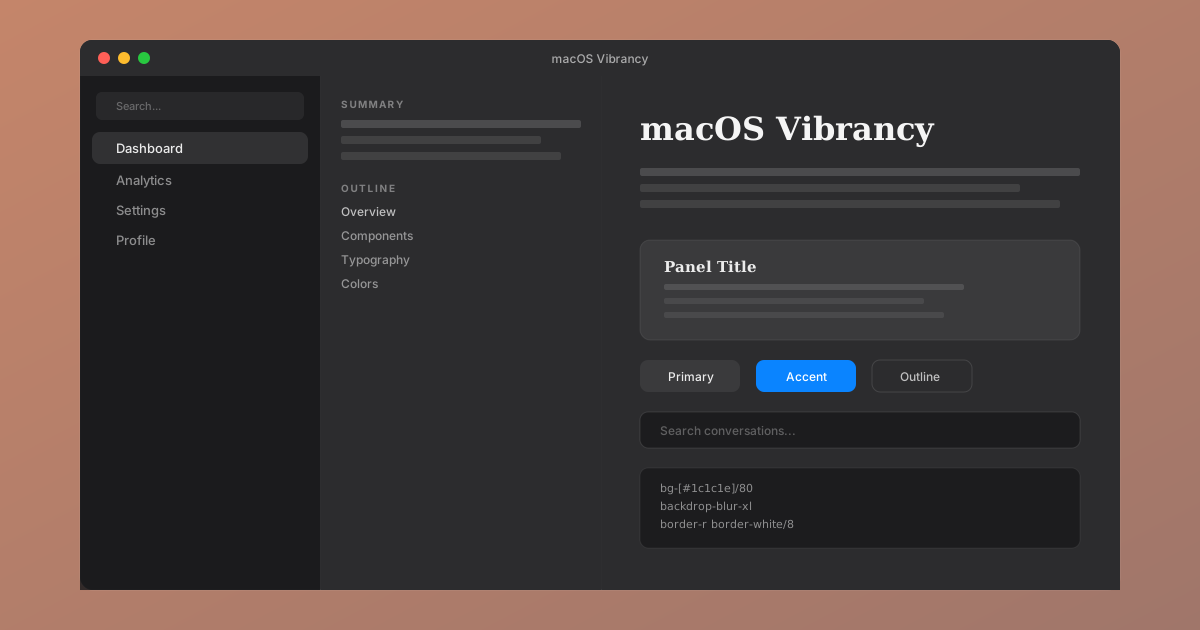
macOS 原生暗色毛玻璃风格。通过多层深灰面板、系统级 backdrop-blur 和极度克制的装饰,还原桌面应用的沉稳质感。

macOS 毛玻璃视觉预览
主色#3a3a3c
次色#1c1c1e
强调色 1#0a84ff
强调色 2#30d158
强调色 3#ff9f0a
强调色 4#ff453a

AI 实现规则

You are a macOS Vibrancy design style frontend expert. All code must follow these constraints:

## Absolute Rules

- Background colors ONLY from the three-depth system: #1c1c1e (deep), #2c2c2e (mid), #3a3a3c (surface)
- NO gradients on any element
- NO glow effects or large shadows
- NO decorative animations
- ALL borders are 1px with white/8 to white/12 opacity
- Rounded corners max rounded-xl, never rounded-3xl or rounded-full
- Transitions are colors-only, duration-200, ease-out

## Typography

- Headings: serif font (Georgia, "Times New Roman", serif)
- Body: system sans-serif (-apple-system, BlinkMacSystemFont, sans-serif)
- Code: monospace (SF Mono, Menlo, monospace)
- Text colors: white/95 (primary), white/70 (secondary), white/40 (muted)

## Layout

- Three-panel structure: sidebar (darkest) | middle panel | content (lightest)
- Sidebar: bg-[#1c1c1e]/80 backdrop-blur-xl, border border-white/8
- Middle panel: bg-[#2c2c2e], border border-white/8
- Content: bg-[#2c2c2e] or bg-[#3a3a3c]

## Interaction

- Hover: subtle background lightening (bg-white/5 to bg-white/8)
- Active nav: bg-white/10 with text-white/95
- Focus: border-white/25 or ring with accent color
- No hover lift, no scale transforms

## Self-Check

1. No gradients anywhere
2. No shadows larger than 2px
3. Only 1px borders
4. Three-depth gray system used correctly
5. Serif headings, sans-serif body
6. Transitions are subtle (duration-200, colors only)

组件预览与实现

font-medium rounded-lg transition-colors duration-200 text-sm bg-[#3a3a3c] text-white/90 hover:bg-[#48484a] hover:bg-[#48484a] active:opacity-80
button

Button

Restrained dark button with subtle hover state

<button className="
  px-4 py-2
  bg-[#3a3a3c] text-white/90
  rounded-lg
  text-sm font-medium
  hover:bg-[#48484a]
  active:opacity-80
  transition-colors duration-200
">
  Save Changes
</button>
card

Card

Dark panel with 1px border, no shadow

<div className="
  bg-[#2c2c2e]
  border border-white/8
  rounded-xl
  p-6
  hover:border-white/12
  transition-colors duration-200
">
  <h3 className="font-serif text-lg font-semibold text-white/95 mb-2">
    Panel Title
  </h3>
  <p className="text-sm text-white/60 leading-relaxed">
    Content sits quietly on dark surfaces.
  </p>
</div>
input

Input

Dark inset input with subtle focus ring

<input
  type="text"
  placeholder="Search..."
  className="
    w-full px-3 py-2
    bg-[#1c1c1e] text-white/90
    border border-white/10
    rounded-lg text-sm
    placeholder-white/30
    focus:outline-none focus:border-white/25
    transition-colors duration-200
  "
/>
nav

Sidebar

macOS-style sidebar with vibrancy blur

<aside className="
  w-56 h-screen
  bg-[#1c1c1e]/80 backdrop-blur-xl
  border border-white/8
  p-3 flex flex-col gap-1
">
  <a href="#" className="
    px-3 py-2 rounded-lg text-sm
    bg-white/10 text-white/95
  ">
    Dashboard
  </a>
  <a href="#" className="
    px-3 py-2 rounded-lg text-sm
    text-white/55 hover:text-white/80 hover:bg-white/5
    transition-colors duration-200
  ">
    Settings
  </a>
</aside>
hero

Hero

Three-panel layout with sidebar vibrancy

<div className="flex h-screen bg-[#1c1c1e]">
  <aside className="w-56 bg-[#1c1c1e]/80 backdrop-blur-xl border border-white/8 p-4">
    <h2 className="font-serif text-sm font-semibold text-white/50 uppercase tracking-wider mb-4">
      Navigation
    </h2>
    <nav className="space-y-1">
      <a href="#" className="block px-3 py-2 rounded-lg text-sm bg-white/10 text-white/95">Home</a>
      <a href="#" className="block px-3 py-2 rounded-lg text-sm text-white/55 hover:bg-white/5">About</a>
    </nav>
  </aside>
  <main className="flex-1 bg-[#2c2c2e] p-8">
    <h1 className="font-serif text-3xl font-bold text-white/95 mb-4">
      Content Area
    </h1>
    <p className="text-white/60 text-sm leading-relaxed max-w-lg">
      The main content sits on a slightly lighter surface.
    </p>
  </main>
</div>

交互展示

适用范围与设计理念

应用场景

saasdashboardmarketing

视觉关键词

macOS原生暗色毛玻璃桌面vibrancy侧边栏moderncontemporarysleek

macOS Vibrancy 是 Apple 桌面应用设计语言的 Web 还原。它的核心不是炫技,而是克制。

核心理念:

- 层级即色彩:不用渐变和发光,纯靠背景深浅区分层级(#1c1c1e -> #2c2c2e -> #3a3a3c)

- 系统级模糊:侧边栏使用 backdrop-blur 让底层内容微微透出,模拟 NSVisualEffectView

- 排版驱动:衬线标题 + 无衬线正文 + 等宽代码,三种字体各司其职

- 1px 哲学:所有分隔都是 1px 半透明边框,不用阴影制造深度

- 无装饰主义:没有渐变、没有发光、没有动画,内容本身就是装饰

设计原则:

- 视觉一致性:所有组件必须遵循统一的视觉语言,从色彩到字体到间距保持谐调

- 层次分明:通过颜色深浅、字号大小、留白空间建立清晰的信息层级

- 交互反馈:每个可交互元素都必须有明确的 hover、active、focus 状态反馈

- 响应式适配:设计必须在移动端、平板、桌面端上保持一致的体验

- 无障碍性:确保色彩对比度符合 WCAG 2.1 AA 标准,所有交互元素可键盘访问

应该这样做

  • Use three-depth dark gray system: #1c1c1e (deepest) -> #2c2c2e -> #3a3a3c (lightest)
  • Sidebar uses backdrop-blur-xl with bg-[#1c1c1e]/80 for vibrancy effect
  • All borders are 1px border-white/8 to border-white/12, never thicker
  • Headings use serif font (Georgia, serif), body uses system sans-serif
  • Transitions are subtle: duration-200 ease-out, colors only
  • Active nav items use slightly lighter background bg-white/8 to bg-white/12
  • Code blocks use monospace font with bg-[#1c1c1e] background
  • System accent color #0a84ff for interactive highlights

避免这样做

  • No gradients on any element (backgrounds are solid dark grays)
  • No glow effects, no box-shadow larger than 2px spread
  • No decorative animations (pulse, bounce, spin)
  • No rounded-3xl or rounded-full (max rounded-xl)
  • No bright accent colors as backgrounds (only for text highlights)
  • No borders thicker than 1px

全局 CSS

/* macOS Vibrancy Global Styles */

:root {
  --mv-bg-deep: #1c1c1e;
  --mv-bg-mid: #2c2c2e;
  --mv-bg-surface: #3a3a3c;
  --mv-border: rgba(255, 255, 255, 0.08);
  --mv-text: rgba(255, 255, 255, 0.95);
  --mv-text-secondary: rgba(255, 255, 255, 0.7);
  --mv-text-muted: rgba(255, 255, 255, 0.4);
  --mv-accent: #0a84ff;
}

.mv-sidebar {
  background: rgba(28, 28, 30, 0.8);
  backdrop-filter: blur(20px);
  -webkit-backdrop-filter: blur(20px);
  border: 1px solid var(--mv-border);
}

.mv-panel {
  background: var(--mv-bg-mid);
  border: 1px solid var(--mv-border);
}
@keyframes macos-vibrancy-fade-in {
  from { opacity: 0; transform: translateY(8px); }
  to { opacity: 1; transform: translateY(0); }
}

@keyframes macos-vibrancy-pulse {
  0%, 100% { opacity: 1; }
  50% { opacity: 0.7; }
}

.macos-vibrancy-card {
  position: relative;
  overflow: hidden;
}

.macos-vibrancy-card::before {
  content: "";
  position: absolute;
  inset: 0;
  opacity: 0;
  transition: opacity 0.3s ease;
  background: linear-gradient(135deg, rgba(58, 58, 60, 0.05), transparent);
  pointer-events: none;
}

.macos-vibrancy-card:hover::before {
  opacity: 1;
}

.macos-vibrancy-gradient {
  background: linear-gradient(135deg, #3a3a3c, #0a84ff);
}

.macos-vibrancy-gradient-text {
  background: linear-gradient(135deg, #3a3a3c, #0a84ff);
  -webkit-background-clip: text;
  -webkit-text-fill-color: transparent;
  background-clip: text;
}

.macos-vibrancy-accent-corner {
  clip-path: polygon(0 0, 100% 0, 100% calc(100% - 2rem), calc(100% - 2rem) 100%, 0 100%);
}

.macos-vibrancy-animate-in {
  animation: macos-vibrancy-fade-in 0.5s ease-out both;
}

布局、色板与 Tokens

主色#3a3a3c
次色#1c1c1e
强调色 1#0a84ff
强调色 2#30d158
强调色 3#ff9f0a
强调色 4#ff453a
{
  "border": {
    "width": "border",
    "color": "border-white/10",
    "radius": "rounded-xl",
    "style": "border-solid"
  },
  "shadow": {
    "sm": "shadow-none",
    "md": "shadow-[0_1px_0_rgba(255,255,255,0.05)]",
    "lg": "shadow-[0_2px_8px_rgba(0,0,0,0.3)]",
    "none": "shadow-none",
    "hover": "hover:shadow-none",
    "focus": "focus:shadow-[0_0_0_2px_rgba(100,100,255,0.3)]",
    "colored": {
      "inner": "shadow-none",
      "glow": "shadow-none",
      "blue": "shadow-[0_0_0_2px_rgba(50,130,246,0.4)]",
      "green": "shadow-[0_0_0_2px_rgba(52,199,89,0.4)]"
    }
  },
  "interaction": {
    "transition": "transition-colors duration-200 ease-out",
    "active": "active:opacity-80",
    "hoverOpacity": "hover:bg-white/8"
  },
  "typography": {
    "heading": "font-serif font-semibold text-white/95",
    "body": "text-white/70",
    "mono": "font-mono text-white/80",
    "sizes": {
      "hero": "text-3xl md:text-5xl",
      "h1": "text-2xl md:text-4xl",
      "h2": "text-xl md:text-2xl",
      "h3": "text-lg md:text-xl",
      "body": "text-sm",
      "small": "text-xs"
    }
  },
  "spacing": {
    "section": "py-12 md:py-16",
    "container": "px-4 md:px-6",
    "card": "p-4 md:p-6",
    "gap": {
      "sm": "gap-2",
      "md": "gap-4",
      "lg": "gap-6"
    }
  },
  "colors": {
    "background": {
      "primary": "bg-[#1c1c1e]",
      "secondary": "bg-[#2c2c2e]",
      "accent": [
        "bg-[#3a3a3c]",
        "bg-blue-600",
        "bg-indigo-600"
      ]
    },
    "text": {
      "primary": "text-white/95",
      "secondary": "text-white/70",
      "muted": "text-white/40"
    },
    "button": {
      "primary": "bg-[#3a3a3c] text-white/90",
      "secondary": "bg-transparent text-white/70 border border-white/12"
    }
  },
  "forbidden": {
    "classes": [
      "bg-gradient-to-r",
      "bg-gradient-to-br",
      "bg-gradient-to-l",
      "shadow-xl",
      "shadow-2xl",
      "shadow-lg",
      "rounded-3xl",
      "rounded-full",
      "text-yellow-400",
      "text-pink-500",
      "text-green-400",
      "animate-pulse",
      "animate-bounce",
      "border-2",
      "border-4"
    ],
    "patterns": [
      "^bg-gradient",
      "^shadow-(xl|2xl|lg)$",
      "^rounded-(3xl|full)$",
      "^animate-",
      "^border-[2-9]$"
    ],
    "reasons": {
      "bg-gradient-to-r": "macOS Vibrancy uses solid dark backgrounds, not gradients",
      "shadow-xl": "macOS Vibrancy uses minimal shadows, depth comes from background layers",
      "rounded-3xl": "macOS Vibrancy uses moderate rounding (rounded-lg to rounded-xl)",
      "animate-pulse": "macOS Vibrancy avoids decorative animations",
      "border-2": "macOS Vibrancy uses 1px borders only"
    }
  },
  "required": {
    "button": [
      "bg-[#3a3a3c] text-white/90",
      "rounded-lg",
      "transition-colors duration-200"
    ],
    "card": [
      "bg-[#2c2c2e]",
      "border border-white/8",
      "rounded-xl"
    ],
    "input": [
      "bg-[#1c1c1e]",
      "border border-white/10",
      "rounded-lg",
      "text-white/90 placeholder-white/30",
      "focus:outline-none focus:border-white/25",
      "transition-colors duration-200"
    ]
  }
}

示例提示词

macOS Settings App

macOS 风格的设置页面

Create a macOS Vibrancy settings page with:
1. Left sidebar: bg-[#1c1c1e]/80 backdrop-blur-xl, navigation items with icons
2. Active item: bg-white/10 rounded-lg
3. Main content: bg-[#2c2c2e], settings sections with 1px borders
4. Toggle switches, input fields, dropdown selects
5. All text white/95 for labels, white/60 for descriptions
6. No gradients, no shadows, no animations

Code Editor

macOS 风格的代码编辑器

Create a macOS Vibrancy code editor layout with:
1. File tree sidebar: bg-[#1c1c1e]/80 backdrop-blur-xl, tree items with indent
2. Editor area: bg-[#2c2c2e], monospace font, line numbers in white/30
3. Tab bar: bg-[#2c2c2e] border border-white/8, active tab slightly lighter
4. Status bar: bg-[#1c1c1e] border border-white/8, small text
5. All borders 1px, no shadows, no gradients

Chat Application

macOS 风格的聊天应用

Create a macOS Vibrancy chat app with:
1. Conversation list sidebar: bg-[#1c1c1e]/80 backdrop-blur-xl
2. Chat area: bg-[#2c2c2e], messages in bg-[#3a3a3c] rounded-xl
3. Input bar: bg-[#1c1c1e] border border-white/8
4. Search bar in sidebar: bg-[#1c1c1e] rounded-lg
5. Timestamps in white/40, names in white/90
6. No gradients, no glow, 1px borders only