返回风格库
视觉风格expressive

机甲风

Mecha

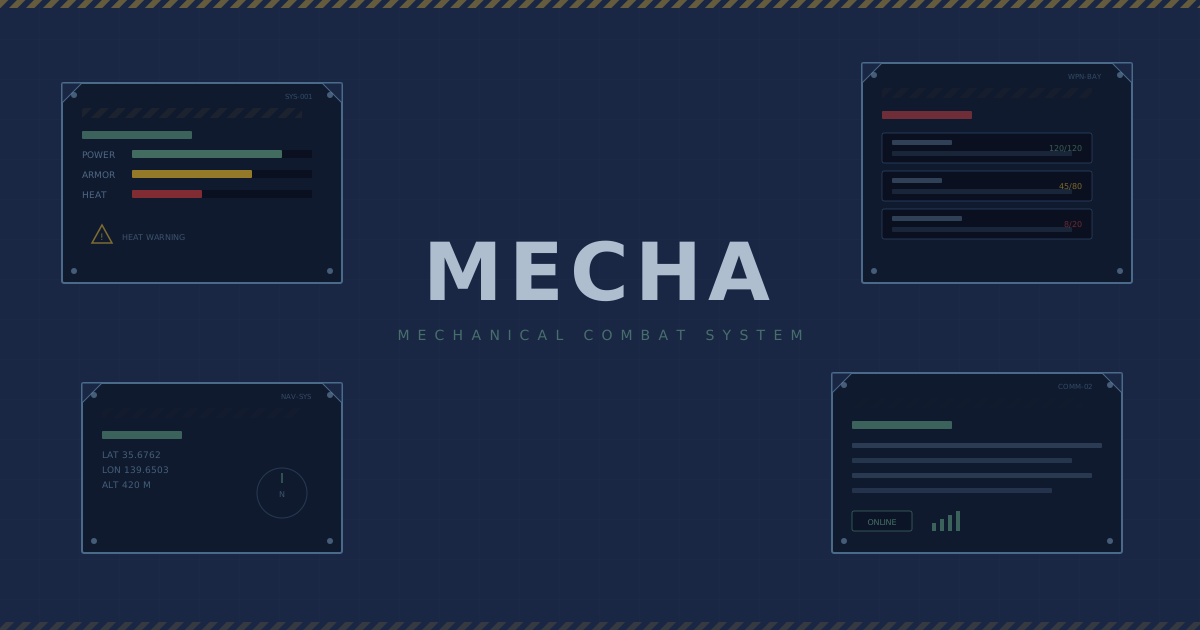
灵感源自高达/EVA等机甲动画的设计风格,科技面板、警告标识、机械质感,军绿和深蓝底色搭配警告黄和危险红,充满工业力量感。

机甲风视觉预览
主色#1a2744
次色#4a5c3a
强调色 1#fbbf24
强调色 2#ef4444
强调色 3#56ed40
强调色 4#069006

AI 实现规则

You are a Mecha design style frontend development expert. All generated code must strictly follow these constraints:

## Absolutely Forbidden

- Soft rounded corners (use rounded-none)
- Pastel or soft colors
- Glassmorphism or blur effects
- Handwritten or decorative fonts

## Must Follow

- Dark base colors: navy #1a2744, military green #4a5c3a
- Warning accents: yellow #fbbf24, red #ef4444
- Monospace fonts font-mono with uppercase tracking-widest
- No border radius rounded-none
- Hard-edge shadows shadow-[4px_4px_0px_color]
- Border-2 for panel edges

## Color Palette

Primary:
- Navy: #1a2744
- Military Green: #4a5c3a
- Warning Yellow: #fbbf24
- Danger Red: #ef4444

## Special Elements

- Tech grid backgrounds
- Warning stripe patterns
- Status indicators with square dots
- Technical annotations and unit numbers
- Panel borders with offset outlines

## Animation & Interaction Rules

- Hydraulic Rigidness: 交互应使用 duration-100~150 + ease-linear 的机械硬切,不使用柔软弹簧缓动。
- Armor Shifting: hover 可通过 clip-path 缺角变化与边框厚度突变,模拟装甲板咬合滑动。
- Hazard Flashing: 关键控件在 hover 需要出现警告色脉冲(红/黄)与斜纹提示,强化工业警戒感。
- Tactical Lock-on: active 使用干脆的直线位移与阴影回落,像扣动重型扳机后的锁定反馈。

## Layout & Spacing
- Section padding: py-16 md:py-24
- Card padding: p-6 md:p-8
- Gap between cards: gap-6 md:gap-8
- Max content width: max-w-6xl mx-auto

## Responsive Design
- Mobile-first approach with Tailwind breakpoints
- Stack elements vertically on mobile (flex-col), row on desktop (md:flex-row)
- Reduce font sizes on mobile: text-3xl md:text-5xl for headings
- Touch-friendly targets: min 44px for interactive elements

## Self-Check Verification
After generating code, verify:
1. All interactive elements have hover/focus/active states
2. Color contrast meets WCAG 2.1 AA (4.5:1 for text)
3. Layout is responsive across breakpoints
4. Typography hierarchy is clear (h1 > h2 > h3 > body)
5. Spacing is consistent using the defined scale
6. All animations respect prefers-reduced-motion

组件预览与实现

font-mono font-bold uppercase tracking-widest rounded-none transition-all duration-200 ease-in-out bg-[#fbbf24] text-[#1a2744] border-2 border-[#1a2744] shadow-[4px_4px_0px_#1a2744] hover:translate-x-[2px] hover:translate-y-[2px] hover:shadow-[2px_2px_0px_#1a2744] active:translate-x-[4px] active:translate-y-[4px] active:shadow-none
button

按钮

机甲风格按钮

<button className="
  group relative overflow-hidden px-10 py-3
  bg-[#2b2b2b] text-[#fbbf24]
  font-mono font-bold uppercase tracking-widest
  rounded-none
  border-2 border-[#fbbf24]/60
  shadow-[4px_4px_0px_#1a2744]
  hover:bg-[#fbbf24] hover:text-[#1a2744]
  hover:border-[#fbbf24]
  active:translate-y-[2px] active:shadow-[2px_2px_0px_#1a2744]
  transition-all duration-100 ease-linear
" style={{ clipPath: "polygon(14px 0,100% 0,100% calc(100% - 14px),calc(100% - 14px) 100%,0 100%,0 14px)" }}>
  <span
    className="pointer-events-none absolute inset-0 opacity-0 transition-none group-hover:opacity-20"
    style={{
      backgroundImage:
        "repeating-linear-gradient(45deg,#000 0px,#000 6px,transparent 6px,transparent 12px)",
    }}
  />
  <span className="relative z-10">ENGAGE_SYSTEM</span>
</button>
card

卡片

机甲风格卡片

<div className="
  group
  relative overflow-hidden
  p-8
  bg-[#1a2744]
  rounded-none
  border-2 border-[#4a5c3a]
  border-4 border-[#fbbf24]
  shadow-[4px_4px_0px_rgba(251,191,36,0.3)]
  hover:border-[10px]
  transition-all duration-150 ease-linear
" style={{ clipPath: "polygon(0 0,100% 0,100% calc(100% - 20px),calc(100% - 20px) 100%,0 100%)" }}>
  <div className="absolute top-2 right-2 h-8 w-8 border-2 border-2 border-[#fbbf24]/40 transition-all duration-150 ease-linear group-hover:translate-x-[-2px] group-hover:translate-y-[2px] group-hover:border-[#fbbf24]" />

  <div className="flex items-center gap-2 mb-3">
    <div className="w-3 h-3 bg-[#fbbf24]"></div>
    <span className="text-xs font-mono text-[#4a5c3a] uppercase tracking-widest">UNIT-01</span>
  </div>
  <h3 className="text-xl font-mono font-bold text-[#fbbf24] uppercase mb-2">
    ARMOR PANEL
  </h3>
  <p className="text-[#4a5c3a]/80 font-mono text-sm">
    Status: Operational
  </p>
  <div className="mt-5 flex items-center justify-end gap-2">
    <span className="text-[10px] font-mono uppercase tracking-widest text-[#fbbf24]">Active</span>
    <div className="h-2 w-2 bg-[#ef4444] group-hover:animate-pulse" />
  </div>
</div>
input

输入框

机甲风格输入框

<input
  type="text"
  placeholder="ENTER COMMAND..."
  className="
    w-full px-4 py-3
    bg-[#1a2744]/80
    border-2 border-[#4a5c3a]
    rounded-none
    text-[#fbbf24] placeholder-[#4a5c3a]/60
    font-mono
    focus:border-[#fbbf24]
    focus:shadow-[0_0_8px_rgba(251,191,36,0.4)]
    focus:outline-none
    transition-all
  "
/>
hero

Hero 区块

机甲风格 Hero

<section className="
  min-h-screen
  flex items-center justify-center
  bg-[#1a2744]
  relative overflow-hidden
">
  {/* Grid lines */}
  <div className="absolute inset-0 bg-[linear-gradient(rgba(74,92,58,0.15)_1px,transparent_1px),linear-gradient(90deg,rgba(74,92,58,0.15)_1px,transparent_1px)] bg-[size:40px_40px]" />

  {/* Warning stripes */}
  <div className="absolute top-0 left-0 right-0 h-2 bg-repeating-linear-gradient(90deg,#fbbf24,#fbbf24_20px,#1a2744_20px,#1a2744_40px)" />

  <div className="relative z-10 text-center px-6">
    <div className="text-xs font-mono text-[#4a5c3a] uppercase tracking-[0.3em] mb-4">
      // SYSTEM ONLINE
    </div>
    <h1 className="text-6xl md:text-8xl font-mono font-bold text-[#fbbf24] uppercase mb-4">
      MECHA
    </h1>
    <p className="text-lg text-[#4a5c3a] font-mono uppercase tracking-wider mb-8">
      ARMOR CLASS // OPERATIONAL
    </p>
    <button className="
      px-10 py-4
      bg-[#ef4444] text-white
      font-mono font-bold uppercase tracking-widest
      rounded-none border-2 border-[#ef4444]
      shadow-[4px_4px_0px_#fbbf24]
      hover:translate-x-[2px] hover:translate-y-[2px]
      hover:shadow-[2px_2px_0px_#fbbf24]
      transition-all
    ">
      DEPLOY
    </button>
  </div>
</section>

交互展示

适用范围与设计理念

应用场景

creative

视觉关键词

high-contrast机甲高达EVA科技面板警告工业军事expressiveboldvibrant

Mecha(机甲风)是源自日本机甲动画(高达、EVA等)的设计美学,融合军事工业风和科幻面板界面。

核心理念:

- 装甲面板:模拟机甲外壳的分块面板设计

- 警告系统:黄色警告和红色危险的信号系统

- 军事工业:军绿、深蓝海军色的工业配色

- 技术标注:等宽字体的技术参数和编号标识

设计原则:

- 视觉一致性:所有组件必须遵循统一的视觉语言,从色彩到字体到间距保持谐调

- 层次分明:通过颜色深浅、字号大小、留白空间建立清晰的信息层级

- 交互反馈:每个可交互元素都必须有明确的 hover、active、focus 状态反馈

- 响应式适配:设计必须在移动端、平板、桌面端上保持一致的体验

- 无障碍性:确保色彩对比度符合 WCAG 2.1 AA 标准,所有交互元素可键盘访问

应该这样做

  • 使用军绿、深蓝海军色为底色
  • 添加警告黄和危险红的强调色
  • 使用等宽字体和大写字母
  • 设计直角无圆角的面板元素
  • 添加技术标注和编号装饰
  • 使用硬边阴影和边框线条

避免这样做

  • 禁止使用柔和的圆角设计
  • 禁止使用柔和的粉色或浅色调
  • 禁止使用花哨的渐变或毛玻璃效果
  • 禁止使用手写体或花体字

全局 CSS

/* Mecha Global Styles */

:root {
  --mecha-navy: #1a2744;
  --mecha-green: #4a5c3a;
  --mecha-yellow: #fbbf24;
  --mecha-red: #ef4444;
}

/* Tech grid background */
.mecha-grid {
  background-image:
    linear-gradient(rgba(74, 92, 58, 0.15) 1px, transparent 1px),
    linear-gradient(90deg, rgba(74, 92, 58, 0.15) 1px, transparent 1px);
  background-size: 40px 40px;
}

/* Warning stripe pattern */
.mecha-warning {
  background: repeating-linear-gradient(
    -45deg,
    var(--mecha-yellow),
    var(--mecha-yellow) 10px,
    var(--mecha-navy) 10px,
    var(--mecha-navy) 20px
  );
}

/* Panel border */
.mecha-panel {
  border: 2px solid var(--mecha-green);
  background: var(--mecha-navy);
  position: relative;
}
.mecha-panel::before {
  content: "";
  position: absolute;
  top: 4px;
  left: 4px;
  right: -4px;
  bottom: -4px;
  border: 1px solid rgba(251, 191, 36, 0.2);
  pointer-events: none;
}

/* Status indicator */
.mecha-status {
  display: flex;
  align-items: center;
  gap: 0.5rem;
  font-family: monospace;
  font-size: 0.75rem;
  text-transform: uppercase;
  letter-spacing: 0.1em;
  color: var(--mecha-green);
}
.mecha-status::before {
  content: "";
  width: 8px;
  height: 8px;
  background: var(--mecha-yellow);
}
@keyframes mecha-fade-in {
  from { opacity: 0; transform: translateY(8px); }
  to { opacity: 1; transform: translateY(0); }
}

@keyframes mecha-pulse {
  0%, 100% { opacity: 1; }
  50% { opacity: 0.7; }
}

.mecha-frosted {
  backdrop-filter: blur(12px) saturate(180%);
  -webkit-backdrop-filter: blur(12px) saturate(180%);
  background: rgba(26, 39, 68, 0.08);
}

.mecha-accent-corner {
  clip-path: polygon(0 0, 100% 0, 100% calc(100% - 2rem), calc(100% - 2rem) 100%, 0 100%);
}

.mecha-animate-in {
  animation: mecha-fade-in 0.5s ease-out both;
}

布局、色板与 Tokens

主色#1a2744
次色#4a5c3a
强调色 1#fbbf24
强调色 2#ef4444
强调色 3#56ed40
强调色 4#069006
{
  "border": {
    "width": "border-2",
    "color": "border-[#4a5c3a]",
    "radius": "rounded-none",
    "style": "border-solid"
  },
  "shadow": {
    "sm": "shadow-[2px_2px_0px_rgba(251,191,36,0.3)]",
    "md": "shadow-[4px_4px_0px_rgba(251,191,36,0.3)]",
    "lg": "shadow-[6px_6px_0px_rgba(251,191,36,0.4)]",
    "none": "shadow-none",
    "hover": "hover:shadow-[6px_6px_0px_rgba(251,191,36,0.5)]",
    "focus": "focus:shadow-[0_0_8px_rgba(251,191,36,0.4)]",
    "colored": {
      "yellow": "shadow-[4px_4px_0px_rgba(251,191,36,0.4)]",
      "red": "shadow-[4px_4px_0px_rgba(239,68,68,0.4)]",
      "green": "shadow-[4px_4px_0px_rgba(74,92,58,0.4)]"
    }
  },
  "interaction": {
    "transition": "transition-all duration-200 ease-in-out",
    "active": "active:translate-x-[4px] active:translate-y-[4px] active:shadow-none",
    "hoverTranslate": "hover:translate-x-[2px] hover:translate-y-[2px]"
  },
  "typography": {
    "heading": "font-mono font-bold uppercase tracking-widest",
    "body": "font-mono",
    "mono": "font-mono",
    "sizes": {
      "hero": "text-4xl md:text-6xl lg:text-8xl",
      "h1": "text-3xl md:text-5xl",
      "h2": "text-2xl md:text-4xl",
      "h3": "text-xl md:text-2xl",
      "body": "text-sm md:text-base",
      "small": "text-xs md:text-sm"
    }
  },
  "spacing": {
    "section": "py-12 md:py-20 lg:py-28",
    "container": "px-4 md:px-8 lg:px-12",
    "card": "p-5 md:p-8",
    "gap": {
      "sm": "gap-3 md:gap-4",
      "md": "gap-4 md:gap-6",
      "lg": "gap-6 md:gap-10"
    }
  },
  "colors": {
    "background": {
      "primary": "bg-[#1a2744]",
      "secondary": "bg-[#4a5c3a]",
      "accent": [
        "bg-[#fbbf24]",
        "bg-[#ef4444]"
      ]
    },
    "text": {
      "primary": "text-[#fbbf24]",
      "secondary": "text-[#4a5c3a]",
      "muted": "text-[#4a5c3a]/70"
    },
    "button": {
      "primary": "bg-[#fbbf24] text-[#1a2744] border-2 border-[#1a2744]",
      "secondary": "bg-[#4a5c3a] text-[#fbbf24] border-2 border-[#fbbf24]/50",
      "danger": "bg-[#ef4444] text-white border-2 border-[#ef4444]"
    }
  },
  "forbidden": {
    "classes": [
      "rounded-lg",
      "rounded-xl",
      "rounded-2xl",
      "rounded-full",
      "bg-white",
      "bg-[#faf6f0]",
      "bg-[#fffbf0]",
      "font-serif",
      "text-[#ff00ff]",
      "text-[#00ffff]",
      "shadow-md",
      "shadow-lg",
      "backdrop-blur",
      "bg-pink-",
      "bg-rose-",
      "text-pink-"
    ],
    "patterns": [
      "^rounded-(?:lg|xl|2xl|full)$",
      "^bg-(?:white|pink-|rose-)",
      "^font-serif$",
      "^shadow-(?:md|lg|xl)$",
      "^backdrop-blur"
    ],
    "reasons": {
      "rounded-lg": "Mecha uses sharp angular shapes (rounded-none) for an industrial feel",
      "bg-white": "Mecha uses dark backgrounds (navy, green) for a military aesthetic",
      "font-serif": "Mecha uses monospace fonts for a technical/military look",
      "shadow-md": "Mecha uses hard-edge offset shadows, not soft ones",
      "backdrop-blur": "Mecha style is opaque and solid, no transparency effects"
    }
  },
  "required": {
    "button": [
      "rounded-none",
      "font-mono font-bold uppercase tracking-widest",
      "border-2",
      "transition-all duration-200 ease-in-out"
    ],
    "card": [
      "rounded-none",
      "bg-[#1a2744]",
      "border-2 border-[#4a5c3a]",
      "shadow-[4px_4px_0px_rgba(251,191,36,0.3)]"
    ],
    "input": [
      "rounded-none",
      "border-2 border-[#4a5c3a]",
      "bg-[#1a2744]/80",
      "text-[#fbbf24]",
      "font-mono",
      "focus:outline-none"
    ]
  }
}

示例提示词

机甲控制台

机甲风格的控制面板界面

Use Mecha style to create a control panel interface:
1. Background: dark navy with tech grid lines
2. Title: mono font in warning yellow
3. Cards: angular panels with green borders
4. Warning stripes and status indicators
5. Overall military-industrial mecha aesthetic

SaaS 着陆页

生成 机甲风风格的 SaaS 产品着陆页

Create a SaaS landing page using Mecha style with hero section, feature grid, testimonials, pricing table, and footer.

作品集展示

生成 机甲风风格的作品集页面

Create a portfolio showcase page using Mecha style with project grid, about section, contact form, and consistent visual language.