返回风格库
视觉风格expressive

纸艺手作

Paper Craft

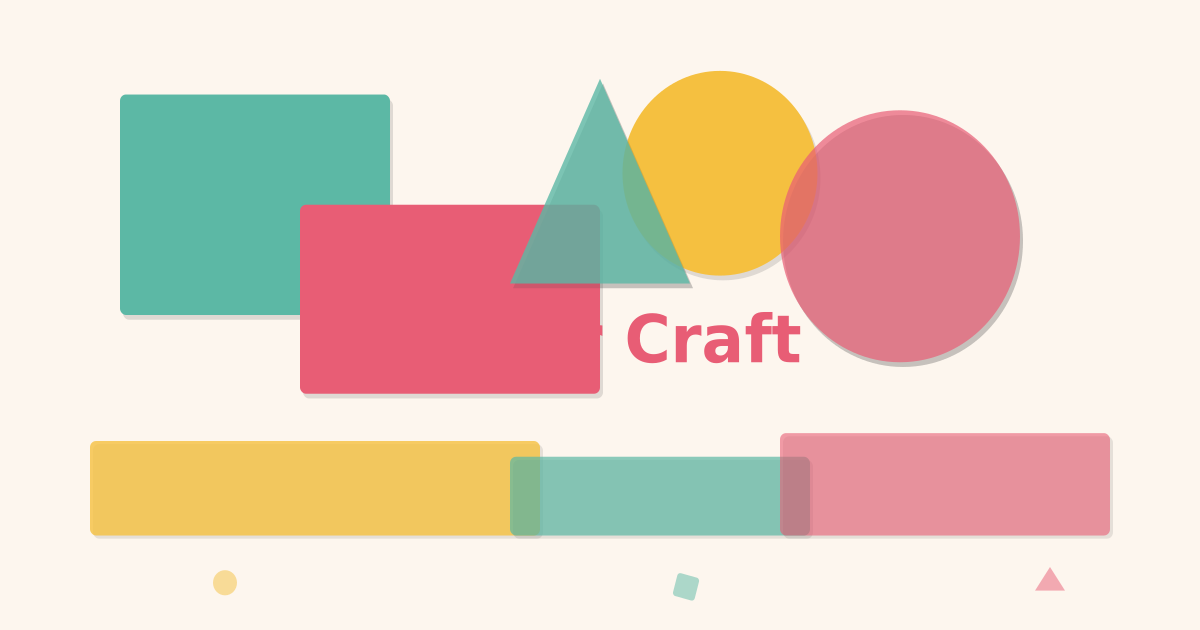
纸艺与剪纸风格,层叠纸张效果、柔和阴影暗示深度、手作质感边缘。适合儿童品牌、教育产品、创意工作室。

纸艺手作视觉预览
主色#e85d75
次色#fdf6ee
强调色 1#5cb8a5
强调色 2#f5c040
强调色 3#6b7fb5
强调色 4#81a7e2

AI 实现规则

STYLE: Paper Craft
TYPE: Handmade paper art interface

MUST USE:
- Warm paper background: bg-[#fdf6ee]
- Paper offset shadows: shadow-[4px_4px_0px_rgba(0,0,0,0.08)]
- Bright craft colors: #e85d75, #5cb8a5, #f5c040, #6b7fb5
- Rounded corners: rounded-xl or rounded-2xl
- Slight rotations: rotate-[1deg] for playful paper feel
- Layered paper effect: multiple stacked divs with rotation
- Dark text on light: text-[#2d2d2d]
- Lift on hover: hover:-translate-y-1

MUST AVOID:
- Dark/black backgrounds
- Neon or glow effects
- Metallic or glass effects
- Sharp precise corners
- Fluorescent colors
- Drop-shadow filters (use box-shadow)
- Gradient glows

COLOR RULES:
- Craft Red: #e85d75 (primary)
- Paper White: #fdf6ee (background)
- Paper Teal: #5cb8a5
- Paper Yellow: #f5c040
- Paper Blue: #6b7fb5
- Text: #2d2d2d

SPECIAL EFFECTS:
- Multi-layer paper stacking with rotation offsets
- Inset shadows for cut-out/embossed feel
- Active press-down: active:translate-y-0.5
- Paper texture overlay for authenticity

## Animation & Interaction Rules

- Layer Separation: 多层纸片 hover 时需向不同方向轻微散开,并放大层间阴影偏移。
- Crisp Cutouts: input focus 或 active 反馈可加深 inset 阴影,模拟纸板切口深度。
- Stiff Paper Feel: 交互用 duration-200/300 + ease-out,避免 spring 弹性。
- Offset Lift: 元素位移时阴影偏移应同步增加,保持纸片离面物理一致性。

组件预览与实现

font-sans font-semibold rounded-xl border-2 border-dashed transition-all duration-200 bg-[#e85d75] text-white border-[#d14a62] shadow-[3px_3px_0_rgba(0,0,0,0.1)] hover:shadow-[4px_4px_0_rgba(0,0,0,0.15)] hover:-translate-y-0.5 active:shadow-[1px_1px_0_rgba(0,0,0,0.1)] active:translate-y-0.5
button

按钮

纸艺风格纸片按钮,强调硬挺纸板位移和阴影联动

// Paper Primary
<button className="px-8 py-3 bg-[#e85d75] text-white font-bold rounded-xl shadow-[4px_4px_0px_rgba(45,45,45,0.15)] hover:-translate-y-1 hover:-translate-x-1 hover:shadow-[6px_6px_0px_rgba(45,45,45,0.15)] active:translate-y-1 active:translate-x-1 active:shadow-[1px_1px_0px_rgba(45,45,45,0.2)] transition-all duration-200 ease-out -rotate-1 hover:rotate-0">
  Create
</button>

// Paper Teal
<button className="px-8 py-3 bg-[#5cb8a5] text-white font-bold rounded-xl shadow-[4px_4px_0px_rgba(45,45,45,0.15)] hover:-translate-y-1 hover:translate-x-0.5 hover:shadow-[6px_6px_0px_rgba(45,45,45,0.14)] active:translate-y-1 active:shadow-[1px_1px_0px_rgba(45,45,45,0.2)] transition-all duration-200 ease-out rotate-[0.5deg] hover:rotate-0">
  Explore
</button>

// Paper Outline
<button className="px-8 py-3 bg-white border-2 border-[#2d2d2d] text-[#2d2d2d] font-bold rounded-xl shadow-[3px_3px_0px_rgba(0,0,0,0.08)] hover:-translate-y-0.5 hover:shadow-[5px_5px_0px_rgba(0,0,0,0.12)] active:translate-y-0.5 active:shadow-[1px_1px_0px_rgba(0,0,0,0.1)] transition-all duration-200 ease-out">
  Learn More
</button>
card

卡片

纸艺风格层叠卡片,hover 时纸层分离散开

<div className="group relative w-full max-w-sm">
  {/* Back paper layer */}
  <div className="absolute inset-0 bg-[#f5c040] rounded-2xl rotate-[2deg] shadow-[3px_3px_0px_rgba(0,0,0,0.08)] group-hover:rotate-[6deg] group-hover:translate-x-2 group-hover:translate-y-1 transition-all duration-300 ease-out" />
  {/* Middle paper layer */}
  <div className="absolute inset-0 bg-[#5cb8a5] rounded-2xl -rotate-[1deg] shadow-[3px_3px_0px_rgba(0,0,0,0.08)] group-hover:-rotate-[4deg] group-hover:-translate-x-2 group-hover:translate-y-2 transition-all duration-300 ease-out delay-75" />
  {/* Front card */}
  <div className="relative bg-white rounded-2xl p-6 shadow-[4px_4px_0px_rgba(0,0,0,0.08)] group-hover:-translate-y-2 group-hover:shadow-[8px_8px_0px_rgba(0,0,0,0.12)] transition-all duration-300 ease-out">
    <div className="inline-block px-3 py-1 bg-[#e85d75] text-white text-xs font-bold rounded-lg mb-3 -rotate-1 group-hover:rotate-0 transition-transform duration-200">
      Craft
    </div>
    <h3 className="text-[#2d2d2d] text-xl font-bold mb-2">
      Paper Origami
    </h3>
    <p className="text-[#666666] leading-relaxed text-sm">
      Fold, cut, and create layered paper sculptures with tactile handmade depth.
    </p>
  </div>
</div>
input

输入框

纸艺风格的裁切输入框

<div className="space-y-2">
  <label className="block text-[#2d2d2d] text-sm font-bold">Your Name</label>
  <div className="relative">
    <input
      type="text"
      className="w-full px-4 py-3 bg-white border-2 border-[#e0d8cc] rounded-xl text-[#2d2d2d] placeholder-[#b0a898] shadow-[inset_2px_2px_4px_rgba(0,0,0,0.04)] focus:outline-none focus:border-[#e85d75] focus:shadow-[inset_4px_4px_8px_rgba(0,0,0,0.08),0_0_0_3px_rgba(232,93,117,0.15)] transition-all duration-200 ease-out"
      placeholder="Write here..."
    />
  </div>
</div>

交互展示

适用范围与设计理念

应用场景

creativemarketing

视觉关键词

纸艺剪纸手作层叠阴影创意质感expressiveboldvibrant

Paper Craft(纸艺手作)的设计灵感来自剪纸艺术、折纸和手工拼贴。通过层叠的纸张效果、柔和的投影和不规则的手作边缘,创造出温暖、有触感的视觉体验。

核心理念:

- 纸张层叠:通过多层阴影和微妙的偏移创造出真实的纸张堆叠感

- 手作质感:边缘略带不规则感,避免过于数字化的精确

- 柔和色彩:使用纸张般温暖的底色搭配明快但不刺眼的彩色纸片

- 深度暗示:通过阴影方向和强度传达前后层次关系

这个风格刻意回避数字世界的冷硬精确感,转而拥抱手工制作的温度。每一个 UI 元素都应该看起来像是用彩色纸张裁剪、折叠和粘贴而成的——按钮是一张凸起的纸片,卡片是堆叠的纸层,输入框是在纸上裁切出的凹槽。

适合场景:儿童教育应用、手工创意商店、幼儿园网站、创意工作室作品集、DIY 教程平台。

应该这样做

  • 背景使用纸白色 bg-[#fdf6ee] 或柔和暖白
  • 卡片使用纸张阴影 shadow-[4px_4px_0px_rgba(0,0,0,0.08)] 模拟凸起效果
  • 按钮使用偏移阴影 shadow-[3px_3px_0px_rgba(0,0,0,0.1)] 模拟纸片凸起
  • 使用圆润但不完美的圆角 rounded-xl 搭配微旋转 rotate-[1deg]
  • 色块使用明快的纸艺色 bg-[#e85d75]、bg-[#5cb8a5]、bg-[#f5c040]
  • 文字使用深色 text-[#2d2d2d] 搭配手写感字体或圆润无衬线字体
  • 层叠效果使用多个 div 带 absolute 定位和不同阴影深度
  • 悬停时微微抬起 hover:-translate-y-1 hover:shadow-[5px_5px_0px_rgba(0,0,0,0.12)]
  • 多层卡片在 hover 时让底层纸片向不同角度散开(Layer Separation)
  • 按钮和卡片位移时,阴影偏移距离同步增大,强调纸片离开桌面的厚度
  • 输入框 focus 使用更深 inset 阴影模拟纸板切口(Cutout Depth)

避免这样做

  • 禁止使用深色/黑色背景
  • 禁止使用发光效果或霓虹阴影
  • 禁止使用金属质感或玻璃拟态
  • 禁止使用过于精确的直角边缘(看起来太数字化)
  • 禁止使用高饱和度的荧光色
  • 禁止使用渐变发光效果
  • 禁止使用 drop-shadow 滤镜(使用 box-shadow 模拟纸张阴影)
  • 禁止使用弹簧回弹曲线(纸片轻但不橡胶)
  • 禁止层叠纸片在 hover 时完全同向运动(会丢失手工剥离感)

全局 CSS

/* Paper Craft Global Styles */
@layer base {
  body {
    @apply bg-[#fdf6ee] text-[#2d2d2d] antialiased;
  }

  ::selection {
    @apply bg-[#f5c040] text-[#2d2d2d];
  }
}

/* Paper texture overlay */
.paper-texture {
  background-image: url("data:image/svg+xml,%3Csvg width='100' height='100' xmlns='http://www.w3.org/2000/svg'%3E%3Cfilter id='noise'%3E%3CfeTurbulence baseFrequency='0.9' numOctaves='4' stitchTiles='stitch'/%3E%3C/filter%3E%3Crect width='100' height='100' filter='url(%23noise)' opacity='0.02'/%3E%3C/svg%3E");
}

/* Paper fold line */
.paper-fold {
  background-image: linear-gradient(
    to right,
    transparent 49.5%,
    rgba(0, 0, 0, 0.05) 49.5%,
    rgba(0, 0, 0, 0.05) 50.5%,
    transparent 50.5%
  );
}
/* Paper Craft Design Tokens */
:root {
  --paper-craft-primary: #e85d75;
  --paper-craft-secondary: #fdf6ee;
  --paper-craft-accent: #5cb8a5;
  --paper-craft-glow: rgba(232, 93, 117, 0.3);
}

@keyframes paper-craft-fade-in {
  from { opacity: 0; transform: translateY(8px); }
  to { opacity: 1; transform: translateY(0); }
}

@keyframes paper-craft-pulse {
  0%, 100% { opacity: 1; }
  50% { opacity: 0.7; }
}

.paper-craft-card {
  position: relative;
  overflow: hidden;
}

.paper-craft-card::before {
  content: "";
  position: absolute;
  inset: 0;
  opacity: 0;
  transition: opacity 0.3s ease;
  background: linear-gradient(135deg, rgba(232, 93, 117, 0.05), transparent);
  pointer-events: none;
}

.paper-craft-card:hover::before {
  opacity: 1;
}

.paper-craft-frosted {
  backdrop-filter: blur(12px) saturate(180%);
  -webkit-backdrop-filter: blur(12px) saturate(180%);
  background: rgba(232, 93, 117, 0.08);
}

.paper-craft-accent-corner {
  clip-path: polygon(0 0, 100% 0, 100% calc(100% - 2rem), calc(100% - 2rem) 100%, 0 100%);
}

.paper-craft-animate-in {
  animation: paper-craft-fade-in 0.5s ease-out both;
}

布局、色板与 Tokens

主色#e85d75
次色#fdf6ee
强调色 1#5cb8a5
强调色 2#f5c040
强调色 3#6b7fb5
强调色 4#81a7e2
{
  "border": {
    "width": "border-2",
    "color": "border-[#e0d8cc]",
    "radius": "rounded-xl",
    "style": "border-solid"
  },
  "shadow": {
    "sm": "shadow-[2px_2px_0px_rgba(0,0,0,0.06)]",
    "md": "shadow-[4px_4px_0px_rgba(0,0,0,0.08)]",
    "lg": "shadow-[6px_6px_0px_rgba(0,0,0,0.1)]",
    "none": "shadow-none",
    "hover": "hover:shadow-[5px_5px_0px_rgba(0,0,0,0.12)]",
    "focus": "focus:shadow-[0_0_0_3px_rgba(232,93,117,0.15)]",
    "colored": {
      "red": "shadow-[4px_4px_0px_rgba(232,93,117,0.2)]",
      "teal": "shadow-[4px_4px_0px_rgba(92,184,165,0.2)]",
      "yellow": "shadow-[4px_4px_0px_rgba(245,192,64,0.2)]"
    }
  },
  "interaction": {
    "transition": "transition-all duration-200",
    "active": "active:translate-y-0.5 active:shadow-[1px_1px_0px_rgba(0,0,0,0.06)]",
    "hoverScale": "hover:-translate-y-0.5"
  },
  "typography": {
    "heading": "font-bold",
    "body": "font-sans",
    "mono": "font-mono",
    "sizes": {
      "hero": "text-4xl md:text-6xl lg:text-7xl",
      "h1": "text-3xl md:text-5xl",
      "h2": "text-2xl md:text-3xl",
      "h3": "text-xl md:text-2xl",
      "body": "text-sm md:text-base",
      "small": "text-xs"
    }
  },
  "spacing": {
    "section": "py-12 md:py-20",
    "container": "px-4 md:px-8",
    "card": "p-6",
    "gap": {
      "sm": "gap-4",
      "md": "gap-6",
      "lg": "gap-8"
    }
  },
  "colors": {
    "background": {
      "primary": "bg-[#fdf6ee]",
      "secondary": "bg-white",
      "accent": [
        "bg-[#e85d75]",
        "bg-[#5cb8a5]",
        "bg-[#f5c040]",
        "bg-[#6b7fb5]"
      ]
    },
    "text": {
      "primary": "text-[#2d2d2d]",
      "secondary": "text-[#666666]",
      "muted": "text-[#b0a898]"
    },
    "button": {
      "primary": "bg-[#e85d75] text-white",
      "secondary": "bg-white text-[#2d2d2d] border-2 border-[#2d2d2d]",
      "danger": "bg-red-500 text-white"
    }
  },
  "forbidden": {
    "classes": [
      "bg-black",
      "bg-gray-900",
      "bg-gray-950",
      "text-white",
      "shadow-[0_0_",
      "text-cyan-",
      "text-fuchsia-",
      "bg-cyan-",
      "bg-fuchsia-"
    ],
    "patterns": [
      "^bg-(?:black|gray-[89])",
      "^shadow-\\[0_0_.*rgba",
      "^text-(?:cyan|fuchsia)-",
      "^bg-(?:cyan|fuchsia)-"
    ],
    "reasons": {
      "bg-black": "Paper Craft uses warm light backgrounds, never dark",
      "shadow-[0_0_": "Use offset paper shadows (shadow-[4px_4px_...]), not glows",
      "text-cyan-": "Use craft colors (#e85d75, #5cb8a5, #f5c040) not neon"
    }
  },
  "required": {
    "button": [
      "px-6 py-3",
      "font-bold",
      "rounded-xl",
      "shadow-[3px_3px_0px_rgba(0,0,0,0.1)]",
      "transition-all duration-200"
    ],
    "card": [
      "bg-white",
      "rounded-2xl",
      "shadow-[4px_4px_0px_rgba(0,0,0,0.08)]"
    ],
    "input": [
      "bg-white",
      "border-2 border-[#e0d8cc]",
      "rounded-xl",
      "text-[#2d2d2d]",
      "focus:border-[#e85d75]",
      "focus:outline-none"
    ]
  }
}

示例提示词

儿童教育平台

纸艺风格的儿童学习界面

Create a kids education landing page using Paper Craft style:
- Warm paper-white background
- Colorful paper-layered cards for subjects
- Playful buttons with paper-shadow and slight rotation
- Badge/label elements as paper cutouts
- Layered paper decorative borders
- Bright but soft craft colors

SaaS 着陆页

生成 纸艺手作风格的 SaaS 产品着陆页

Create a SaaS landing page using Paper Craft style with hero section, feature grid, testimonials, pricing table, and footer.

作品集展示

生成 纸艺手作风格的作品集页面

Create a portfolio showcase page using Paper Craft style with project grid, about section, contact form, and consistent visual language.