返回风格库
视觉风格retro

VHS美学

VHS Aesthetic

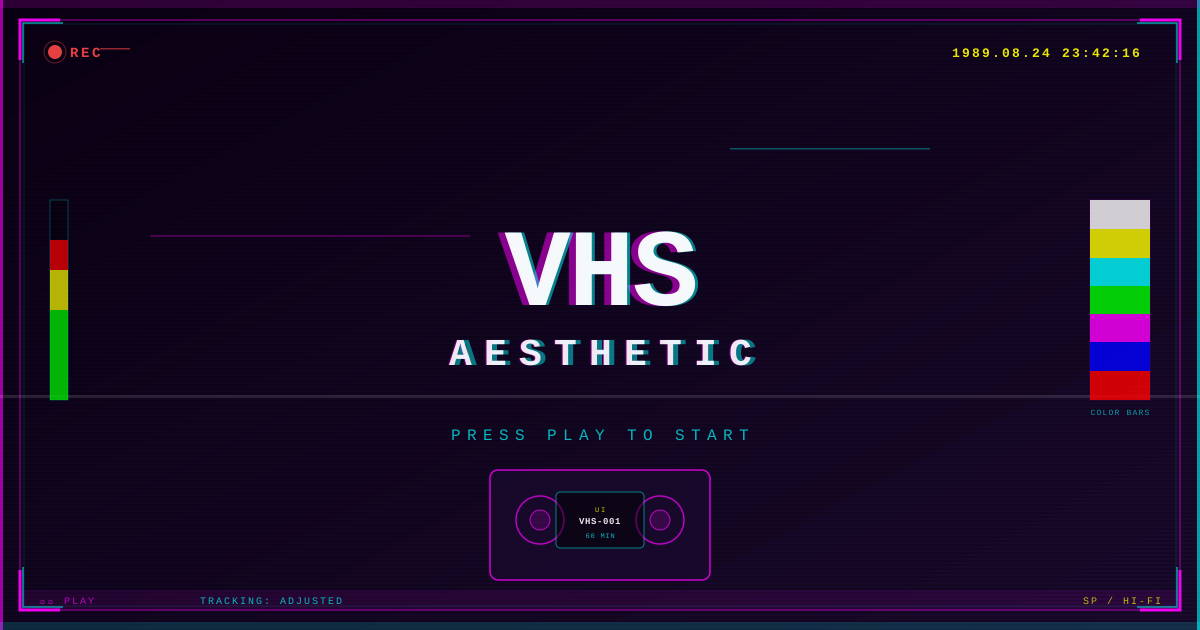
80-90年代VHS录像带视觉美学,色彩失真、扫描线噪点与信号故障效果。适合怀旧、复古科技、创意影像项目。

VHS美学视觉预览
主色#ff00ff
次色#000000
强调色 1#00ffff
强调色 2#ffff00
强调色 3#00ff00
强调色 4#1a0a2e

AI 实现规则

STYLE: VHS Aesthetic
TYPE: 80-90s VHS tape visual aesthetic

MUST USE:
- Background: Black (#000000) or deep purple (#1a0a2e)
- Primary accent: Magenta (#ff00ff) for borders, glows, highlights
- Secondary accent: Cyan (#00ffff) for text, secondary elements
- Tertiary: Yellow (#ffff00) for warnings/timestamps, Green (#00ff00) for status
- All text: Monospace font, uppercase preferred
- Scanlines: Apply repeating-linear-gradient overlay
- Color separation: Use text-shadow with offset magenta and cyan
- Timestamps: Show "REC" indicator, date/time in corner
- Noise: Add grain/noise texture overlay with low opacity
- Tracking distortion: Slight horizontal offset on hover/animation

MUST AVOID:
- Light/white backgrounds
- Pastel or muted colors
- Serif or sans-serif body fonts
- Large border-radius (max 2px)
- Smooth gradients
- Subtle/standard shadows (use neon glow only)

COLOR RULES:
- Primary: Magenta (#ff00ff)
- Accent 1: Cyan (#00ffff)
- Accent 2: Yellow (#ffff00)
- Accent 3: Green (#00ff00)
- Background: Black (#000000) or Deep Purple (#1a0a2e)

SPECIAL EFFECTS:
- Scanline overlay via CSS repeating-linear-gradient
- RGB chromatic aberration on headings (magenta left, cyan right)
- VHS tracking distortion animation
- Noise/grain texture overlay
- Blinking REC indicator
- VHS timestamp badges

## Animation & Interaction Rules
- Tape Tracking Jitter: 彻底抛弃丝滑动画。悬停时,必须通过极短时间的 `duration-75` 产生干脆甚至有些生硬的画面反馈(例如瞬间的 `skew-x-2` 或 `translate-x-1`),模拟老式录像带播放时的画面跳动(Tracking error)。
- Chroma Split Glow: 霓虹阴影不能只是发光,必须是"错位"的。悬停时,洋红(Magenta)和青色(Cyan)的 `text-shadow` 或 `box-shadow` 必须向相反方向剧烈拉开距离,模拟磁带色散。
- Scanline Distortion: 卡片上覆盖的扫描线(Scanline)在容器被悬停时,应加快垂直滚动的速度,或者瞬间改变不透明度(如从 `opacity-10` 变为 `opacity-30`)。
- Playback Snap: 点击 (`:active`) 状态应该模拟按下了沉重的录像机物理按键。消除所有光晕,并产生生硬的下沉(`active:scale-95 active:shadow-none`)。

组件预览与实现

font-mono font-bold uppercase tracking-widest rounded-sm border transition-all duration-200 bg-[#ff00ff] text-black border-[#ff00ff] shadow-[2px_2px_0px_0px_#00ffff] hover:shadow-[4px_4px_0px_0px_#00ffff,-2px_-2px_0px_0px_#ff00ff] hover:text-white active:translate-x-[2px] active:translate-y-[2px] active:shadow-none
button

按钮

VHS 霓虹按钮,带发光效果和单色字体

<button className="group relative px-8 py-3 bg-[#ff00ff]/20 text-[#ff00ff] font-mono font-bold uppercase tracking-widest border-2 border-[#ff00ff] shadow-[2px_0_#00ffff,-2px_0_#ff00ff] hover:bg-[#ff00ff]/40 hover:text-white hover:shadow-[4px_0_#00ffff,-4px_0_#ff00ff] hover:skew-x-2 active:skew-x-0 active:scale-95 active:shadow-none transition-all duration-75 ease-linear overflow-hidden">
  <div className="absolute inset-0 bg-[repeating-linear-gradient(0deg,transparent,transparent_2px,rgba(255,255,255,0.1)_2px,rgba(255,255,255,0.1)_4px)] opacity-50 group-hover:opacity-100 transition-opacity duration-75" />
  <span className="relative z-10">PLAY_TAPE</span>
</button>
card

卡片

VHS 风格的深紫色卡片,带品红边框和扫描线叠加

<div className="group relative bg-[#1a0a2e]/90 border-2 border-[#ff00ff]/40 p-8 shadow-[0_0_15px_rgba(255,0,255,0.2)] hover:border-[#00ffff] hover:shadow-[0_0_25px_rgba(0,255,255,0.4)] transition-all duration-100 ease-linear cursor-crosshair">
  {/* 扫描线与录像带杂音 */}
  <div className="absolute inset-0 bg-[repeating-linear-gradient(0deg,transparent,transparent_2px,rgba(0,255,255,0.05)_2px,rgba(0,255,255,0.05)_4px)] pointer-events-none group-hover:opacity-100 opacity-60 transition-opacity duration-100" />
  <div className="absolute top-1/4 left-0 w-full h-2 bg-white/10 opacity-0 group-hover:opacity-100 group-hover:animate-pulse" />

  <div className="relative z-10">
    <div className="flex items-center gap-2 mb-4">
      <div className="w-3 h-3 bg-red-500 rounded-full group-hover:animate-pulse shadow-[0_0_8px_#ef4444]" />
      <span className="text-red-500 font-mono text-xs uppercase tracking-widest">REC</span>
    </div>
    <h3 className="text-white text-3xl font-mono font-bold uppercase mb-2 group-hover:-skew-x-3 transition-transform duration-75" style={{ textShadow: '-2px 0 #ff00ff, 2px 0 #00ffff' }}>
      NIGHT_DRIVE.AVI
    </h3>
    <p className="text-[#00ffff]/70 font-mono text-sm group-hover:text-white transition-colors duration-100">
      &gt; Playback tracking adjusted. Signal acquired.
    </p>
  </div>
</div>
input

输入框

VHS 终端风格输入框

<div className="space-y-2">
  <label className="block text-[#00ffff] font-mono text-xs uppercase tracking-[0.2em]">Search Tape</label>
  <input
    type="text"
    className="w-full px-4 py-3 bg-black/60 border border-[#00ffff]/30 text-[#00ffff] font-mono text-sm placeholder:text-[#00ffff]/30 focus:outline-none focus:border-[#00ffff] focus:shadow-[0_0_10px_rgba(0,255,255,0.3)] transition-all duration-200"
    placeholder="ENTER TITLE..."
  />
</div>
nav

导航栏

VHS 导航栏,带REC指示灯和时间戳

<nav className="bg-black/90 border border-[#ff00ff]/20 px-6 py-3 flex justify-between items-center">
  <div className="flex items-center gap-3">
    <div className="flex items-center gap-2">
      <div className="w-2 h-2 bg-red-500 rounded-full animate-pulse" />
      <span className="text-red-500 font-mono text-xs uppercase">REC</span>
    </div>
    <span className="text-white font-mono text-sm uppercase tracking-wider">VHS Aesthetic</span>
  </div>
  <span className="text-[#ffff00] font-mono text-xs">1989.08.24 PM 11:42</span>
</nav>
hero

Hero 区域

VHS Hero 区域,带 RGB 色差标题和扫描线

<section className="relative bg-black overflow-hidden px-6 py-20">
  {/* Scanline overlay */}
  <div className="absolute inset-0 bg-[repeating-linear-gradient(0deg,transparent,transparent_2px,rgba(255,0,255,0.02)_2px,rgba(255,0,255,0.02)_4px)] pointer-events-none" />
  <div className="relative max-w-4xl mx-auto text-center">
    <h1 className="text-5xl md:text-7xl font-mono font-bold uppercase tracking-wider text-white" style={{textShadow: '-2px 0 #ff00ff, 2px 0 #00ffff'}}>
      VHS AESTHETIC
    </h1>
    <p className="mt-4 text-[#ff00ff]/70 font-mono text-sm">
      PRESS PLAY TO START
    </p>
  </div>
</section>
footer

页脚

VHS 页脚

<footer className="bg-black border border-[#ff00ff]/20 px-6 py-6">
  <p className="text-[#ff00ff]/40 font-mono text-xs text-center uppercase tracking-widest">
    VHS Aesthetic // UI Library // STOP
  </p>
</footer>

交互展示

适用范围与设计理念

应用场景

creativeeditorial

视觉关键词

retrohigh-contrastVHSretroglitchscanlines80s90staperecordingnostalgiachromatic aberration

VHS Aesthetic 再现了80-90年代VHS磁带的模拟温暖感与美丽缺陷。

核心理念:

- 扫描线叠加:所有内容区域使用 repeating-linear-gradient 水平扫描线

- RGB色差:文字使用品红和青色偏移的 text-shadow 模拟色彩分离

- 噪点纹理:低透明度的噪点/颗粒叠加层

- 信号故障:hover 时出现水平位移的 tracking 干扰效果

- VHS标记:REC指示灯、时间戳、计数器等录像带UI元素

- 单色字体:所有文字使用 monospace 字体,大写优先

- 极暗背景:黑色或深紫色背景最大化霓虹对比度

设计原则:

- 视觉一致性:所有组件必须遵循统一的视觉语言,从色彩到字体到间距保持谐调

- 层次分明:通过颜色深浅、字号大小、留白空间建立清晰的信息层级

- 交互反馈:每个可交互元素都必须有明确的 hover、active、focus 状态反馈

- 响应式适配:设计必须在移动端、平板、桌面端上保持一致的体验

- 无障碍性:确保色彩对比度符合 WCAG 2.1 AA 标准,所有交互元素可键盘访问

应该这样做

  • Apply horizontal scanline overlay on all content areas
  • Use RGB color separation on text (magenta + cyan offset shadows)
  • Add noise/grain texture overlay with low opacity
  • Include VHS-style timestamps and REC indicators
  • Use monospace fonts throughout
  • Keep backgrounds dark (black or deep purple #1a0a2e)
  • Add tracking distortion effects on hover
  • Use uppercase text with wide letter-spacing for labels

避免这样做

  • Don't use clean, crisp typography
  • Don't use light backgrounds
  • Don't use modern sans-serif fonts
  • Don't use smooth gradients
  • Don't use rounded corners larger than 2px
  • Don't use subtle, refined effects

全局 CSS

/* VHS Aesthetic Global Styles */
@layer base {
  body {
    @apply bg-black text-white antialiased;
    background-image:
      repeating-linear-gradient(
        0deg,
        transparent,
        transparent 2px,
        rgba(255, 0, 255, 0.02) 2px,
        rgba(255, 0, 255, 0.02) 4px
      );
  }

  h1, h2, h3 {
    text-shadow: -2px 0 #ff00ff, 2px 0 #00ffff;
  }

  ::selection {
    @apply bg-[#ff00ff] text-black;
  }
}

@keyframes vhs-tracking {
  0% { transform: translateX(0); }
  10% { transform: translateX(-2px); }
  20% { transform: translateX(3px); }
  30% { transform: translateX(0); }
  100% { transform: translateX(0); }
}
@keyframes vhs-noise {
  0%, 100% { opacity: 0.03; }
  50% { opacity: 0.08; }
}
@keyframes vhs-blink {
  0%, 49% { opacity: 1; }
  50%, 100% { opacity: 0; }
}
@keyframes vhs-color-shift {
  0%, 100% { text-shadow: -2px 0 #ff00ff, 2px 0 #00ffff; }
  33% { text-shadow: -3px 0 #ff00ff, 1px 0 #00ffff; }
  66% { text-shadow: -1px 0 #ff00ff, 3px 0 #00ffff; }
}
/* VHS Aesthetic Design Tokens */
:root {
  --vhs-aesthetic-primary: #ff00ff;
  --vhs-aesthetic-secondary: #000000;
  --vhs-aesthetic-accent: #00ffff;
  --vhs-aesthetic-glow: rgba(255, 0, 255, 0.3);
}

.vhs-aesthetic-card {
  position: relative;
  overflow: hidden;
}

.vhs-aesthetic-card::before {
  content: "";
  position: absolute;
  inset: 0;
  opacity: 0;
  transition: opacity 0.3s ease;
  background: linear-gradient(135deg, rgba(255, 0, 255, 0.05), transparent);
  pointer-events: none;
}

.vhs-aesthetic-card:hover::before {
  opacity: 1;
}

.vhs-aesthetic-frosted {
  backdrop-filter: blur(12px) saturate(180%);
  -webkit-backdrop-filter: blur(12px) saturate(180%);
  background: rgba(255, 0, 255, 0.08);
}

.vhs-aesthetic-accent-corner {
  clip-path: polygon(0 0, 100% 0, 100% calc(100% - 2rem), calc(100% - 2rem) 100%, 0 100%);
}

.vhs-aesthetic-animate-in {
  animation: vhs-aesthetic-fade-in 0.5s ease-out both;
}

.vhs-aesthetic-focus { outline: 2px solid var(--vhs-aesthetic-primary, currentColor); outline-offset: 2px; }

布局、色板与 Tokens

主色#ff00ff
次色#000000
强调色 1#00ffff
强调色 2#ffff00
强调色 3#00ff00
强调色 4#1a0a2e
{
  "border": {
    "width": "border",
    "color": "border-[#ff00ff]/20",
    "radius": "rounded-none",
    "style": "border-solid"
  },
  "shadow": {
    "sm": "shadow-[0_0_10px_rgba(255,0,255,0.2)]",
    "md": "shadow-[0_0_20px_rgba(255,0,255,0.4)]",
    "lg": "shadow-[0_0_40px_rgba(255,0,255,0.6)]",
    "none": "shadow-none",
    "hover": "shadow-[0_0_20px_rgba(255,0,255,0.3)]",
    "focus": "shadow-[0_0_15px_rgba(0,255,255,0.4)]",
    "colored": {
      "green": "shadow-[0_0_20px_rgba(0,255,0,0.5)]",
      "magenta": "shadow-[0_0_20px_rgba(255,0,255,0.5)]",
      "cyan": "shadow-[0_0_20px_rgba(0,255,255,0.5)]",
      "red": "shadow-[0_0_20px_rgba(255,0,0,0.5)]",
      "yellow": "shadow-[0_0_20px_rgba(255,255,0,0.5)]"
    }
  },
  "interaction": {
    "transition": "transition-all duration-200",
    "active": "active:scale-[0.98]",
    "hoverScale": "hover:shadow-[0_0_20px_rgba(255,0,255,0.3)] hover:border-[#ff00ff]/40"
  },
  "typography": {
    "heading": "font-mono font-bold uppercase tracking-wider",
    "body": "font-mono text-sm",
    "mono": "font-mono",
    "sizes": {
      "hero": "text-4xl md:text-6xl lg:text-8xl",
      "h1": "text-3xl md:text-5xl",
      "h2": "text-2xl md:text-3xl",
      "h3": "text-xl md:text-2xl",
      "body": "text-sm md:text-base",
      "small": "text-xs"
    }
  },
  "spacing": {
    "section": "py-16 md:py-24",
    "container": "px-6 md:px-8",
    "card": "p-6",
    "gap": {
      "sm": "gap-4",
      "md": "gap-6",
      "lg": "gap-8"
    }
  },
  "colors": {
    "background": {
      "primary": "bg-black",
      "secondary": "bg-[#1a0a2e]",
      "accent": [
        "bg-[#ff00ff]/10",
        "bg-[#00ffff]/10",
        "bg-[#ffff00]/10"
      ]
    },
    "text": {
      "primary": "text-white",
      "secondary": "text-[#00ffff]",
      "muted": "text-white/40"
    },
    "button": {
      "primary": "bg-[#ff00ff]/20 text-[#ff00ff] border border-[#ff00ff]",
      "secondary": "bg-[#00ffff]/10 text-[#00ffff] border border-[#00ffff]/50",
      "danger": "bg-red-600/30 text-red-400 border border-red-500"
    }
  },
  "forbidden": {
    "classes": [
      "bg-white",
      "bg-gray-50",
      "bg-gray-100",
      "rounded-xl",
      "rounded-2xl",
      "rounded-3xl",
      "rounded-full",
      "shadow-sm",
      "shadow-md",
      "shadow-lg",
      "font-sans",
      "font-serif",
      "text-gray-900",
      "text-gray-800"
    ],
    "patterns": [
      "^bg-white",
      "^bg-gray-[1-3]",
      "^shadow-(?!\\[)",
      "^rounded-[23]xl",
      "^rounded-full",
      "^font-serif",
      "^font-sans"
    ],
    "reasons": {
      "bg-white": "VHS aesthetic requires dark backgrounds (black or deep purple)",
      "shadow-md": "Use neon glow shadows: shadow-[0_0_20px_rgba(255,0,255,0.4)]",
      "rounded-2xl": "VHS aesthetic uses sharp edges (rounded-none)",
      "font-sans": "Use monospace fonts only for VHS terminal/tape aesthetic",
      "font-serif": "Use monospace fonts only for VHS terminal/tape aesthetic"
    }
  },
  "required": {
    "button": [
      "font-mono",
      "uppercase",
      "tracking-widest",
      "border",
      "transition-all duration-200"
    ],
    "card": [
      "bg-[#1a0a2e]",
      "border"
    ],
    "input": [
      "bg-black",
      "border",
      "text-[#00ffff]",
      "font-mono",
      "focus:border-[#00ffff]",
      "focus:shadow-[0_0_10px_rgba(0,255,255,0.3)]"
    ]
  }
}

示例提示词

VHS录像带档案页

带跟踪失真和时间戳的VHS风格视频档案

Create a VHS-style video archive page:
- Dark background with scanline and noise overlays
- Tape collection cards with magenta glow borders
- REC indicator and VHS timestamps
- RGB color separation on titles
- Tracking distortion on hover

复古电视频道指南

带扫描线和色彩溢出的复古频道表

Build a retro TV channel guide using VHS Aesthetic:
- Black background with scanline effect
- Channel listings with cyan text
- Time slots in yellow monospace
- Signal strength indicators in green
- Static/noise effect between channels

90年代怀旧落地页

VHS磁带美学的怀旧主题页面

Design a 90s nostalgia landing page with VHS aesthetic:
- Full-screen hero with RGB chromatic aberration title
- VHS playback controls interface
- Tape collection showcase grid
- Retro timestamp and counter overlays
- Magenta and cyan neon accents throughout